
שלום מישהו יודע איך אפשר להתקין סינון לכרוםבוק?בימאית דמיונות
תשאלי את מוקד אור, מאמין שהם ידעוחופר
תודה!בימאית דמיונות
לא מספיק מכירפצל"פאחרונה
אבל לפי מה שקראתי זה מבוסס על לינוקס
אז כדאי לנסות את נטפרי
אז כדאי לנסות את נטפרי
הושעיתי מווצאפשירה_11
כבר פעם שלישית.
וכל פעם ההשעיה ארוכה יותר
הבנתי שזה כי אני משתמשת באפליקציה לא רשמית של וואצפ, של כושר פליי
מישו יודע האם זה ימשיך ככה או שעלולים לחסום אותי לגמרי משימוש?
זה חשוב לי כי אין לי בעיה להיחסים מידי פעם בשבייל להמישיך להשתמש באפלירציה
אבל אם עלולים לחסום אותי לגמרי אני צריכה להזדרז ולהוריד את הרשמית
את אכן צריכה להוריד את הרשמית. WA לא אוהבים אתמשה
התואמות
השאלה שלישירה_11
אם אני לא יוריד יוציאו אותי לגמרי??
כי האפליקציה שאני משתמשת בה מאוד טובה לי.
ואני מוכנה לספוג את הבדיחות האלה אבל לא את זה שישעו אותי לגמרי בלי אפשרות לחזור
כי האפליקציה שאני משתמשת בה מאוד טובה לי.
ואני מוכנה לספוג את הבדיחות האלה אבל לא את זה שישעו אותי לגמרי בלי אפשרות לחזור
השאלה היא מה הבעיה של האפליקציה הרשמיתחופר
שבגללה כושר פליי טרחו לייצר חלופית
בעיקר סינוןשירה_11
היא מסתירה לי תמונות של אנשי קשר וסטטוסיפ
חוץ מזה יש לה כל מיני דברים חמודים כמו שאפשר לראות הודעה יד פעמית כמו הודעה רגילה וכו
אבל בעיקר הקימו אותה בשביל הסינון
חוץ מזה יש לה כל מיני דברים חמודים כמו שאפשר לראות הודעה יד פעמית כמו הודעה רגילה וכו
אבל בעיקר הקימו אותה בשביל הסינון
עוד פעם הושעיתייייי עזרהשירה_11
את צריכה את הרשמית כנראהמשה
לא יעזור
יש לך מושג אם עלולים להשעות אותי לצמיתות?שירה_11
לא מכיר מספיקמשה
תודה אשמח מי שיודעשירה_11
ראיתי לפני כמה זמןפצל"פ
לא זוכר איפה
שיש סוג של ווצאפ פרוץ שאי אפשר לחסום אותך בו
אולי יכול לעזור לך בתקופות בין לבין כשאת חסומה
שיש סוג של ווצאפ פרוץ שאי אפשר לחסום אותך בו
אולי יכול לעזור לך בתקופות בין לבין כשאת חסומה
האשלהשירה_11
אם אני יכולהלהוריד אותה במקביל לוואצפ הקיים אצלי, לא נראלי.
בגלל שהוואצפ שלי הוא לא מקורי, כשאמחק אותו לא יהיה לי גיבוי לוואצפ שיחות תמונות וכו.
כרגע לא נראלי שיוציאו אותי לצמיתות כי השעו אותי הרבה פעמים כל פעם שעה.
אם היו מרחקיים אותי לצמיתות היו מודיעים לי מן הסתם, או שזה כבר היה קורה מזמן
אפשר להוריד במקבילפצל"פ
זה קובץ עם סיומת אחרת
איך אני מורידה?שירה_11
מה אני רושמת?
אני לא זוכר איפה ראיתי את זהפצל"פאחרונה
אני עוד מנסה לחפש
הי רציתי לשאולפלאפונ.
משהו כי באמת אין לי טיפת מושג בענייני טכנו' מחשבים
אני שמה לב שכבר לאורך תק' לא קצרה הפלאפון שלי מתחבר לבד לבלוטוס, פעם אחת ראיתי בשידור חי שמשתלטים על החיבור או אי החיבור לאינטרנט... כאילו מישהו זר מחבר ומנתק אותי ואני מנוטרלת..זה אומר ששואבים לי מידע? אם כן ,שאבו כנראה הכל כבר מזמן..
אשמח לדעת מה שאבו ולמה ממשיכים לעשות את זה?
מי יכול לעשות את זה?
האמת שחוץ מלגלוש בערוץ 7 וקצת יוטיוב אני לא עושה כלום עם המכשיר,
ואיך אני יכולה להתגונן מזה?
להחליף מס' או מכשיר יעזור לי? מה לבקש? מי ידע לעזור לי?
אוף איזה באסה להיות בורה בדברים האלה..
תודה רבה!!!
אני שמה לב שכבר לאורך תק' לא קצרה הפלאפון שלי מתחבר לבד לבלוטוס, פעם אחת ראיתי בשידור חי שמשתלטים על החיבור או אי החיבור לאינטרנט... כאילו מישהו זר מחבר ומנתק אותי ואני מנוטרלת..זה אומר ששואבים לי מידע? אם כן ,שאבו כנראה הכל כבר מזמן..
אשמח לדעת מה שאבו ולמה ממשיכים לעשות את זה?
מי יכול לעשות את זה?
האמת שחוץ מלגלוש בערוץ 7 וקצת יוטיוב אני לא עושה כלום עם המכשיר,
ואיך אני יכולה להתגונן מזה?
להחליף מס' או מכשיר יעזור לי? מה לבקש? מי ידע לעזור לי?
אוף איזה באסה להיות בורה בדברים האלה..
תודה רבה!!!
את בטוחה שמדובר בחיבור הבלוטות׳?אצבעוני
כי דווקא החיבור הזה מצריך תאום עם הצד השני - ככה מתחברים למשל לרמקול נייד, או לאוזניות.
את משתמשת בבלוטות׳ למשהו? לאוזניות?
את משתמשת בבלוטות׳ למשהו? לאוזניות?
אני לא משתמשת בלוטוס בכללפלאפונ.
אבל מחברים אותי לבד.
אני כמעט בטוחה שמישהו פרץ למשהו אצלי, רק לא יודעת מה ומי ואיך כי לא היה את זה בעבר הרחוק. אולי דרך הערוץ? כי אם אני באינטרנט אני נמצאת רק כאן בערך...
אני משתמשת באוזניות כדי לשמוע שיעורים ושירים מיוטיוב, מעבר לזה כלום ושום דבר.
אולי דרך זה שהגבתי כמה וכמה פעמים למטה בכתובות של הערוץ? עוד לפני שאני מתחילה לכתוב משהו יש את העיגול המסתובב הזה שם, אולי עוקבים אחרי משם? אוף איזה סרט
אני כמעט בטוחה שמישהו פרץ למשהו אצלי, רק לא יודעת מה ומי ואיך כי לא היה את זה בעבר הרחוק. אולי דרך הערוץ? כי אם אני באינטרנט אני נמצאת רק כאן בערך...
אני משתמשת באוזניות כדי לשמוע שיעורים ושירים מיוטיוב, מעבר לזה כלום ושום דבר.
אולי דרך זה שהגבתי כמה וכמה פעמים למטה בכתובות של הערוץ? עוד לפני שאני מתחילה לכתוב משהו יש את העיגול המסתובב הזה שם, אולי עוקבים אחרי משם? אוף איזה סרט
אז תכבי בהגדרות את הבלוטות׳.אצבעוני
ורק כשאת משתמשת לאוזניות, תפעילי את זה, ובסיום תכבי שוב.
לדעתי את סתם חוששת.
אף אחד לא מתחבר אליך.
המרחק של חיבור בלוטות׳ הוא כמה מטרים, נראה לי עד 15 מטרים. צריך להיות מנש קרוב אליך כדי להתחבר. וגם אז, הקישור מבקש לאשר את החיבור.
העיגול המסתובב לא קשור לבלוטות׳.
לדעתי את סתם חוששת.
אף אחד לא מתחבר אליך.
המרחק של חיבור בלוטות׳ הוא כמה מטרים, נראה לי עד 15 מטרים. צריך להיות מנש קרוב אליך כדי להתחבר. וגם אז, הקישור מבקש לאשר את החיבור.
העיגול המסתובב לא קשור לבלוטות׳.
תודה רבה, מאוד מקווה שאתה צודק.פלאפונ.
איך מכבים? איפה זה נמצא בכלל??
תודה שוב🌹
את הנטרול מהפעלת או כיבוי האנטרט אני לא דמיינתי, ראיתי את זה בפועל ממש.
אף פעם לא התבקשתי לאשר חיבור משום מה זה מתחבר לבד,לא כל הזמן רק לפעמים.
תודה שוב🌹
את הנטרול מהפעלת או כיבוי האנטרט אני לא דמיינתי, ראיתי את זה בפועל ממש.
אף פעם לא התבקשתי לאשר חיבור משום מה זה מתחבר לבד,לא כל הזמן רק לפעמים.
איזה מכשיר יש לך, אייפון או אנדרואיד?אצבעוני
שיואמיפלאפונ.
בדקתי עכשיו בהגדרות וכתוב שכבוי הבלוטוס כשלפני שעתיים מצאתי אותו דולק וכיבית ואח"כ שוב מצאתי דולק וכיביתי. מכובה עכשיו כי כיביתי אותו מבחוץ.
אם זה נדלק לבד זה ממש מוזר.אצבעוני
אני מכירה סמסונג ואייפון. זה מה שיש לנו במשפחה.
לפעמים הוא נדלק לבד בקרבה למכשיר מסוייםמשה
כמו שWIFI נדלק אוטומטית כשמתקרבים למקום שיש בו רשת קבועה. זה לא תמיד "פריצה".
אתה בטוח שזה קורה?אצבעוני
שאם סוגרים את ה wifi (מזיזים את הכפתור למצב סגור), הכפתור זז מעצמו ופותח את ה wifi בקרבת רשת מוכרת?
אף פעם לא נתקלתי בזה בסמסונג. אולי זה ככה במכשירים כנו שיאומי?
אף פעם לא נתקלתי בזה בסמסונג. אולי זה ככה במכשירים כנו שיאומי?
נתקלתי בזה בכמה מכשירי אנדרואידמשה
אצלי לדעתי זה מופעל עם IFTTH (בכוונה) אבל יש עוד כלים שיודעים לעשות את זה.
וואי תודהפלאפונ.
ה"השתלטות" על החיבור או ניתוק מהאינטרנט גם יכולה לקרות?.
בימים האחרונים זה קורה לעיתים ממש תכופות,התכיפות רק הולכת עולה רק עכשיו כיבית איזה עוד פעמיים נוספות .זה לא מוזר?..ואני באותם האיזורים בסביבות אותם אנשים פחות או יותר
בעצם השאלה איך אדע אם פרצו או לא? מי יכול לבדוק לי את זה?
בימים האחרונים זה קורה לעיתים ממש תכופות,התכיפות רק הולכת עולה רק עכשיו כיבית איזה עוד פעמיים נוספות .זה לא מוזר?..ואני באותם האיזורים בסביבות אותם אנשים פחות או יותר
בעצם השאלה איך אדע אם פרצו או לא? מי יכול לבדוק לי את זה?
רוב הסיכויים שזה לא זדוני אלא תקלת תקשורתמשה
למשל מכשירים שמפריעים או יותר מדי רשתות אלחוטיות
יכול להיות שהתקנת פעם אפליקציה מוזרה?חופר
תשובהshaulreznik
"למה יש כ"כ הרבה רע בעולם?!"
את מוצאת עצמך שואלת-זועקת פעם אחר פעם.
השאלה הזו שמנקרת,
ההרגשה הנוראית שעוטפת
שוב
ושוב
ושוב
ההרגשה הזו שהכל סוגר
שלכל כיוון שלא תסתכלי - יש רע.
וכאב.
הו הו כמה כאב כמה!!!
כאב לאנשים שיקרים לך
וכאב לעוד אנשים שיקרים לך
וכאב לעצמך
וכאב לעם שלך
וכאב על אובדנים שחווית וחווים אנשים
וכאב בכל מעגל שהוא
חברות, משפחה, עבודה, הארץ, העולם...
כאילו די, זה כאילו לא נגמר ואין סוף לרע הזה!!!
ואת כבר בהצפה.
הצפה של כל מה שחווית ושמעת וראית.
פשוט הצפה.
תדמייני כל אדם, גם ההכי מדהים וחזק שבהם, שהוא עובר הצפה - הוא לא יכול יותר. די. נגמרו הכוחות. נגמרו המצברים.
נגמר המלאי.
אין.
פשוט אין.
ולא רק שאין - גם כל הכאב והקושי מציף
ואז יש עוד קושי אחר - וגם הוא מציף
ועוד
ועוד
ולפעמים אפילו לנשום אי אפשר ברוגע!!!
אז במצבים כאלה חייבים חייבים יקרה רגע לעצור!
לעצור ואפילו רק להסדיר נשימה.
פיזית.
פיזית לעשות תרגיל של נשימה עמוקה
למשל, להכניס עמוק אוויר מלוא הריאות במשך 4 שניות,
להשהות אותו עוד שתי שניות בלי להוציא
ואז לנשוף אותו החוצה לאט לאט עוד 4 שניות.
ככה לעשות סטים של נשימות, לפחות איזה 6-7 סטים.
לעצום עיניים.
לשים את עצמך במקום שקט.
שקט שקט.
גם אם זה ללכת לחדר ולהיות רגע רק את עם עצמך שתי דקות.
ותני רגע לעצמך לספר לך מה *את* חווית.
ומה עובר עלייך?
ועם מה את מתמודדת?
ומה חשוך לך ובך כעת?
ופתאום לשמוע את עצמך ממשיכה לספר לך,
שזה פשוטו טו מאץ'!
יותר מדי!
זה יותר מדי לך, לכולם!
ועצמך ממשיכה ורוצה רגע לבקש ממך
לעצור
ולקחת עוד קצת זמן לעצמך
אפילו אם מועט,
להסדיר נשימה
לסדר מחשבות
לנשום
להתמלא
לשתות
אולי תה חם ומתוק
מקלחת נעימה וחמה
כל פינוק שבא לך
פינוק קטן של אוכל
תפילה לקב"ה שישלח כוחות
שיתוף
חיבוק
וכמובן - שינה!
שיר מעודד
מוזיקה בכללי
פרק קצר של סדרה מצחיקה או סטנדאפ
להביט בתמונות של האוצרות שלך בטלפון או במחשב,
לצאת לשאוף אוויר בחוץ
הליכה קצרה
וכל הטענת מצברים אחרת!
וכל מה שיכול לעשות לך טוב!
ועד שלא תרגישי שאת מתמלאת בחזרה, לפחות 80% מה"סוללה" שנקראית "את" - את *לא* משקיעה שום אנרגיה בדברים שמרוקנים אותך!
אי אפשר יקרה!
את על 0% בסוללה ועדיין משתמשת בכל הכוח במכשיר...
אפשר להתפוצץ, לקרוס חלילה.
האיתותים הללו של הגוף שלך החכם
ושל הנפש החכמה
אומרים לך -
היי יקרה! עד כאן!
אנחנו חייבים מילוי!
בואי תדאגי לנו למילוי
ואז נחזור כמו גדולים עם כוחות מחודשים להשפיע עוד ועוד טוב בכל המעגלים
אבל קודם המעגל שלך.
את.
עצמך.
מתמלאת.
נושמת.
מתחזקת.
שמחה.
ואח"כ כמובן אישך והילדים
ואז המשפחה המורחבת
והחברה היקרה
ושאר המעגלים
לאט לאט.
אי אפשר הכל בבת אחת.
את רק בן אדם אחד.
מדהים, אבל אחד. ובן אדם. אנושית. בשר ודם.
עם גבולות יכולת
עם אנרגיה שהיא לא בלתי נגמרת אלא היא מוגבלת כי אנחנו בני אדם...
ואיפה שנבחר להוציא אותה - זה בהכרח יבוא על חשבון משהו אחר.
לכן עכשיו התיעדוף הראשון הוא להוציא אותה רק על ההתמלאות שלך.
ורק אז, שתהיי מלאה יותר, תוכלי להוציא ממנה גם לעולם כולו.
אנשים שאינך יכולה לעזור להם - בין אם זה במעגלים קרובים ובין אם הם רחוקים - זו עבודה, אבל את מנסה להפנותם הלאה לעזרה המתאימה אם את יכולה, להתפלל עבורכם, לקוות, לשלוח חיבוק.
וזהו.
לשחרר.
אי אפשר לעזור לכולם.
את רק בן אדם.
אחד.
יחיד ומיוחד.
ואחד.
וכמה טוב את כן משפיעה היכן שאת כן יכולה!
ועוזרת!
ותומכת
ומאירה
ומחדדת
וכמה אכפתיות נובעת ממך
כ"כ כ"כ אכפת לך!
ורק בגלל זה את כ"כ מתאמצת!
ואני רוצה לבקש שבתוך הכל יהיה אכפת לך גם מעצמך!
שתבחיני גם בגבולות הגזרה שלך!
שתזהי גם את קצה גבול היכולת שלך!
את מה את כן יכולה
ומה את לא
את מה עושה לך טוב וממלא
ומה מרוקן
את מתי את יכולה לתת יותר מעצמך
ומתי את זקוקה לקבל, או להעניק לעצמך
ואלו דקויות שהן לימוד של חיים...
לימוד שהוא מרתק, ולפעמים שובר, ונופלים, ומתאכזבים,
אבל בסופו של דבר גדלים!
וגם מכל הרע שבעולם -
נכון.
הוא קיים.
אבל הטוב קיים שבעתיים!
"ברגע קטון עזבתיך
ורחמים גדולים אקבצך"
הרע הוא כמו רגע קטון!
והטוב הוא עשרות מונים טוב ומאיר וגדול כ"כ כ"כ!
ותמיד אני נזכרת בעלון של שבת שקראתי כשהיינו ילדים. כתב בו הרב חנן פורת זצ"ל, וקראו לו "מעט מן האור"
ותמיד זה הזכיר לי שמעט מן האור - דוחה הרבה מן החושך
אז כל אחד מאיתנו הוא "אור קטן"
וכולנו "אור איתן"
ולא רק בשיר ילדים חמוד
אלא באמת באמת
לכל אחד ואחת מאיתנו יש כוח על!
לעשות ולהשפיע טוב בגבול היכולת שלו
במעגלים שלו
ואותו האור ממשיך ומשפיע עוד ועוד ועוד
ממש כמו אבן שזורקים על פני המים והיא יוצרת עיגולים עיגולים סביבה
כי חיוך אחד שלך לילדה,
שהלכה שמחה לבית הספר וחייכה לעוד ילדה,
שהרימה אותה כי הייתה בהרגשה נוראית לפני כן,
וחזרה הביתה ועשתה נחת רוח להוריה שהיא שמחה,
או אמירה ועזרה שלך לבנות כאן בפורום או בחיים האמיתיים,
שהצלת
ועודדת
והרמת
ותמכת
ואז הן היו עם עוד כוח לילדים, לעצמן, לאיש,
שבחזרה המשיכו טוב במעגלים שלהם,
ואותם אנשים שפגשו גם
ואין לדבר סוף!
כן כן
ל***טוב*** אין באמת סוף!
הוא באמת אינסופי!!!
אז את יקרה מוסיפה אור
ותוסיפי אור
וקצת פחות תחשבי על החושך.
כי כשמוסיפים אור החושך ממילא מסתלק ומתמעט
ומספיק אפילו אור קטן
ואפילו יחיד
בכדי לגרש חושך גדול גודל
ויש לנו את בורא עולם
שהכל שלו
והכל מאיתו
הטוב והרע
ולימדנו לברך על הרעה כשם שמברכים על הטובה
ולימדנו שהכל לטובה!
כל מה שעושה הקב"ה לטובה הוא עושה
ולהתחזק באמונה
בביטחון באבא שלנו בשמים שיודע טוב טוב מה הוא עושה
והוא אחראי על הכל
ולפעמים התפקיד שלנו הוא
"הרפו.
הרפו ודעו כי טוב השם!"
ובמה שאינו בשליטתך יקרה – הרפי.
לא כל העולם על כתפייך היקרות
ומה שלא בגבול יכולתך - להרפות ולשים על הקב"ה. הוא כל יכול באמת באמת.
ואת תראי, ותמשיכי לראות את כל הטוב *שכבר קיים*
באנשים טובים
בנפלאות הבורא
בילדים שיש
במשפחה
בחיוכים
באוכל הטעים
בשפע
במיטה הנוחה
בגוף שמתפקד
ובכל פינה ממש ממש יש טוב ובשפע
ולהגדיל את המיקוד שלנו דווקא עליו
לא לקחת אותו לעולם כמובן מאליו
אלא להיפך - להנכיח אותו
לראות אותו
להעצים אותו
להודות עליו
ההודיה עצמה מעניקה כ"כ הרבה כוח! כ"כ!
להתפלל במילים שלך
את כל הכאב
והקושי
והתקוות
הכל הכל הכל
לקב"ה
ולהודות לו על מה שכן יש
ולבקש על מה שעוד לא
והוא שומע הכל
והוא כל יכול
ותמשיכי להתחזק
להוסיף לעצמך מקורות של מילוי מצברים בכל יום ויום
להתקרב למה שעושה לך טוב
להתרחק ממה שעושה לך רע
ולהמשיך כך בעוז ובגבורה ובאמונה
והדברים ב"ה עוד יתבהרו
כולם
לאט לאט
את כבר יכולה לראות ב"ה בחוש איך כ"כ הרבה חזיתות שקרו לכ"כ הרבה אנשים - פתאום במבט של אפילו לא כ"כ הרבה זמן - פתאום כולם במקום אחר לגמרי!
ההיא שהתגרשה - התחתנה מחדש ומאושרת
ההיא שלא זכתה לילדים - חובקת תאומים
השבויים שכבר חזרו
החולים שנרפאו
העקרות שנפקדו
הרווקות שהתחתנו
הזוגיות שהתחזקה
הילדים שגדלו והביאו ברכה גדולה ונחת עצומה
הכוחות הפנימיים שכל אחד ואחת גילו בתוכם
הערבות ההדדית
האחדות
החסד
העזרה
השמחה
הצחוק
החיוכים
רגעי האושר
והשפע
והטוב.
הטוב.
שקיים!
ושילך ויגדל ב"ה
ואת עצמך חלק מהטוב הגדול הזה!
ועכשיו, לכי ומלאי את עצמך
ותני לטוב שבך לגדול  ❤
❤
גם לי היה את זה בפון הקודם שליפצל"פאחרונה
אין לי מושג ממה זה
אבל זה לא נראלי פריצה או משהו
הפלאפון עבד אחלה ולא גנבו לי כרטיסי אשראי או משהו
אבל זה לא נראלי פריצה או משהו
הפלאפון עבד אחלה ולא גנבו לי כרטיסי אשראי או משהו
בעיה בהתקנת נטספארקאנונימי12344
שלום לכולם, כשאני מנסה לפתוח את קובץ ההתקנה ההודעה הזאת הזאת מופיעה לי: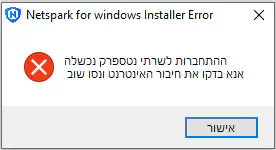
החיבור שלי לאינטרנט בסדר, ושלחתי אימייל לעזרה הטכנית אבל הם לא עונים לי, מישהו יודע איך פותרים את זה?
מחכים, לוקח להם יום- יומיים לענותחופר
תוכנה איומהJewice
שים סינון אמיתי ונורמלי של אחד מאלה:
GenTech Solution – The best filtering solution
Geder Filter
Techloq | Internet Protection
Meshimer
Nativ USA | The kosher internet filter. Protection with all the access
PurifEYE Internet Filtering Solutions
SwiftGuard – The Speedy Internet Filter – SwiftGuard, the internet content filter catering to those who want to block inappropriate websites while maintaining speed.
WebChaver » Screen Accountability & Filtering
GenTech Solution – The best filtering solution
Geder Filter
Techloq | Internet Protection
Meshimer
Nativ USA | The kosher internet filter. Protection with all the access
PurifEYE Internet Filtering Solutions
SwiftGuard – The Speedy Internet Filter – SwiftGuard, the internet content filter catering to those who want to block inappropriate websites while maintaining speed.
WebChaver » Screen Accountability & Filtering
אני כרגע עם נטספרק ולא מעוניין להחליףאנונימי12344
תודה בכול מקרה
מישהו יודע איך פותרים את זה?אנונימי12344
נטספארק לא עונים לי עדיין...
מנסים לשאול את מוקד אורחופר
תודהאנונימי12344
ניסית אוליפצל"פאחרונה
לנסות להפעיל את הקובץ התקנה ב"הפעל כמנהל מערכת"?
לא סביר שזה באמת הסיבה
אבל שווה לנסות
לא סביר שזה באמת הסיבה
אבל שווה לנסות
מעבר מווינדוס 7 לווינדוס 10צוק
שלום
שוקלים לעבור מוינזדוז 7 לוינדוז 10 - האם זה ישפיע על הקבצים של מסמכים תמונות וכו שיש במחשב ? ימחק אותם? [נניח שלא עושים גיבוי.]
ווינדוס 10 זה סוס טרויאניJewice
למרות שכל ווינדוס היא כזו, אבל 10 והלאה הרבה יותר גרועות…
הכל שאלה איך יבוצע העדכון ואיפה הקבצים שמוריםחופר
במחשב
^^פצל"פאחרונה
בגדול אם את משדרגת דרך קובץ iso או כונן חיצוני כלשהוא (בגדול נראלי כשאת משדרגת כשהמחשב שלך דלוק ופועל)
אמור להציע לך 2 אופציות איך להתקין
עם או בלי למחוק קבצים
אמור להציע לך 2 אופציות איך להתקין
עם או בלי למחוק קבצים
כפתורים דביקים עקב תה שנשפך על המחשב.. מה עושים?מבקש אמונה
נייח? נייד ?משה
ניידמבקש אמונה
לא שותים תה עם סוכר. וגםארנב מחשבים
אם במקרה מה שמפריע זה רק מבחוץ שזה דביק למגע - אפשר לנקות עם מגבון כשהמחשב הפוך (שלא יטפטף פנימה).
אם זה דביק מבפנים והמקשים לא עובדים כמו שצריך, צריך לנקות מבפנים. ברוב המחשבים קל מאוד להוציא ולהחזיר כל מקש בנפרד. תוציא את המקשים שנפגעו ותנקה את הסוויטש שמתחתיו (עם אלכוהול, או מים כשאין חשש שיטפטף על אלקטרוניקה, אפשר אם מקל אוזניים למשל) (ואת המקש עצמו מלמטה)
אם אף פעם לא פירקת והחזרת מקשים של מחשב נייד תראה קודם ביוטיוב איך עושים את זה.
יש גם מחשבים (בעיקר ישנים יחסית) שממש קל להוציא את כל המקלדת.
איזה דגם זה?
אם זה דביק מבפנים והמקשים לא עובדים כמו שצריך, צריך לנקות מבפנים. ברוב המחשבים קל מאוד להוציא ולהחזיר כל מקש בנפרד. תוציא את המקשים שנפגעו ותנקה את הסוויטש שמתחתיו (עם אלכוהול, או מים כשאין חשש שיטפטף על אלקטרוניקה, אפשר אם מקל אוזניים למשל) (ואת המקש עצמו מלמטה)
אם אף פעם לא פירקת והחזרת מקשים של מחשב נייד תראה קודם ביוטיוב איך עושים את זה.
יש גם מחשבים (בעיקר ישנים יחסית) שממש קל להוציא את כל המקלדת.
איזה דגם זה?
מחשב של lenovoמבקש אמונהאחרונה
"למה יש כ"כ הרבה רע בעולם?!"
את מוצאת עצמך שואלת-זועקת פעם אחר פעם.
השאלה הזו שמנקרת,
ההרגשה הנוראית שעוטפת
שוב
ושוב
ושוב
ההרגשה הזו שהכל סוגר
שלכל כיוון שלא תסתכלי - יש רע.
וכאב.
הו הו כמה כאב כמה!!!
כאב לאנשים שיקרים לך
וכאב לעוד אנשים שיקרים לך
וכאב לעצמך
וכאב לעם שלך
וכאב על אובדנים שחווית וחווים אנשים
וכאב בכל מעגל שהוא
חברות, משפחה, עבודה, הארץ, העולם...
כאילו די, זה כאילו לא נגמר ואין סוף לרע הזה!!!
ואת כבר בהצפה.
הצפה של כל מה שחווית ושמעת וראית.
פשוט הצפה.
תדמייני כל אדם, גם ההכי מדהים וחזק שבהם, שהוא עובר הצפה - הוא לא יכול יותר. די. נגמרו הכוחות. נגמרו המצברים.
נגמר המלאי.
אין.
פשוט אין.
ולא רק שאין - גם כל הכאב והקושי מציף
ואז יש עוד קושי אחר - וגם הוא מציף
ועוד
ועוד
ולפעמים אפילו לנשום אי אפשר ברוגע!!!
אז במצבים כאלה חייבים חייבים יקרה רגע לעצור!
לעצור ואפילו רק להסדיר נשימה.
פיזית.
פיזית לעשות תרגיל של נשימה עמוקה
למשל, להכניס עמוק אוויר מלוא הריאות במשך 4 שניות,
להשהות אותו עוד שתי שניות בלי להוציא
ואז לנשוף אותו החוצה לאט לאט עוד 4 שניות.
ככה לעשות סטים של נשימות, לפחות איזה 6-7 סטים.
לעצום עיניים.
לשים את עצמך במקום שקט.
שקט שקט.
גם אם זה ללכת לחדר ולהיות רגע רק את עם עצמך שתי דקות.
ותני רגע לעצמך לספר לך מה *את* חווית.
ומה עובר עלייך?
ועם מה את מתמודדת?
ומה חשוך לך ובך כעת?
ופתאום לשמוע את עצמך ממשיכה לספר לך,
שזה פשוטו טו מאץ'!
יותר מדי!
זה יותר מדי לך, לכולם!
ועצמך ממשיכה ורוצה רגע לבקש ממך
לעצור
ולקחת עוד קצת זמן לעצמך
אפילו אם מועט,
להסדיר נשימה
לסדר מחשבות
לנשום
להתמלא
לשתות
אולי תה חם ומתוק
מקלחת נעימה וחמה
כל פינוק שבא לך
פינוק קטן של אוכל
תפילה לקב"ה שישלח כוחות
שיתוף
חיבוק
וכמובן - שינה!
שיר מעודד
מוזיקה בכללי
פרק קצר של סדרה מצחיקה או סטנדאפ
להביט בתמונות של האוצרות שלך בטלפון או במחשב,
לצאת לשאוף אוויר בחוץ
הליכה קצרה
וכל הטענת מצברים אחרת!
וכל מה שיכול לעשות לך טוב!
ועד שלא תרגישי שאת מתמלאת בחזרה, לפחות 80% מה"סוללה" שנקראית "את" - את *לא* משקיעה שום אנרגיה בדברים שמרוקנים אותך!
אי אפשר יקרה!
את על 0% בסוללה ועדיין משתמשת בכל הכוח במכשיר...
אפשר להתפוצץ, לקרוס חלילה.
האיתותים הללו של הגוף שלך החכם
ושל הנפש החכמה
אומרים לך -
היי יקרה! עד כאן!
אנחנו חייבים מילוי!
בואי תדאגי לנו למילוי
ואז נחזור כמו גדולים עם כוחות מחודשים להשפיע עוד ועוד טוב בכל המעגלים
אבל קודם המעגל שלך.
את.
עצמך.
מתמלאת.
נושמת.
מתחזקת.
שמחה.
ואח"כ כמובן אישך והילדים
ואז המשפחה המורחבת
והחברה היקרה
ושאר המעגלים
לאט לאט.
אי אפשר הכל בבת אחת.
את רק בן אדם אחד.
מדהים, אבל אחד. ובן אדם. אנושית. בשר ודם.
עם גבולות יכולת
עם אנרגיה שהיא לא בלתי נגמרת אלא היא מוגבלת כי אנחנו בני אדם...
ואיפה שנבחר להוציא אותה - זה בהכרח יבוא על חשבון משהו אחר.
לכן עכשיו התיעדוף הראשון הוא להוציא אותה רק על ההתמלאות שלך.
ורק אז, שתהיי מלאה יותר, תוכלי להוציא ממנה גם לעולם כולו.
אנשים שאינך יכולה לעזור להם - בין אם זה במעגלים קרובים ובין אם הם רחוקים - זו עבודה, אבל את מנסה להפנותם הלאה לעזרה המתאימה אם את יכולה, להתפלל עבורכם, לקוות, לשלוח חיבוק.
וזהו.
לשחרר.
אי אפשר לעזור לכולם.
את רק בן אדם.
אחד.
יחיד ומיוחד.
ואחד.
וכמה טוב את כן משפיעה היכן שאת כן יכולה!
ועוזרת!
ותומכת
ומאירה
ומחדדת
וכמה אכפתיות נובעת ממך
כ"כ כ"כ אכפת לך!
ורק בגלל זה את כ"כ מתאמצת!
ואני רוצה לבקש שבתוך הכל יהיה אכפת לך גם מעצמך!
שתבחיני גם בגבולות הגזרה שלך!
שתזהי גם את קצה גבול היכולת שלך!
את מה את כן יכולה
ומה את לא
את מה עושה לך טוב וממלא
ומה מרוקן
את מתי את יכולה לתת יותר מעצמך
ומתי את זקוקה לקבל, או להעניק לעצמך
ואלו דקויות שהן לימוד של חיים...
לימוד שהוא מרתק, ולפעמים שובר, ונופלים, ומתאכזבים,
אבל בסופו של דבר גדלים!
וגם מכל הרע שבעולם -
נכון.
הוא קיים.
אבל הטוב קיים שבעתיים!
"ברגע קטון עזבתיך
ורחמים גדולים אקבצך"
הרע הוא כמו רגע קטון!
והטוב הוא עשרות מונים טוב ומאיר וגדול כ"כ כ"כ!
ותמיד אני נזכרת בעלון של שבת שקראתי כשהיינו ילדים. כתב בו הרב חנן פורת זצ"ל, וקראו לו "מעט מן האור"
ותמיד זה הזכיר לי שמעט מן האור - דוחה הרבה מן החושך
אז כל אחד מאיתנו הוא "אור קטן"
וכולנו "אור איתן"
ולא רק בשיר ילדים חמוד
אלא באמת באמת
לכל אחד ואחת מאיתנו יש כוח על!
לעשות ולהשפיע טוב בגבול היכולת שלו
במעגלים שלו
ואותו האור ממשיך ומשפיע עוד ועוד ועוד
ממש כמו אבן שזורקים על פני המים והיא יוצרת עיגולים עיגולים סביבה
כי חיוך אחד שלך לילדה,
שהלכה שמחה לבית הספר וחייכה לעוד ילדה,
שהרימה אותה כי הייתה בהרגשה נוראית לפני כן,
וחזרה הביתה ועשתה נחת רוח להוריה שהיא שמחה,
או אמירה ועזרה שלך לבנות כאן בפורום או בחיים האמיתיים,
שהצלת
ועודדת
והרמת
ותמכת
ואז הן היו עם עוד כוח לילדים, לעצמן, לאיש,
שבחזרה המשיכו טוב במעגלים שלהם,
ואותם אנשים שפגשו גם
ואין לדבר סוף!
כן כן
ל***טוב*** אין באמת סוף!
הוא באמת אינסופי!!!
אז את יקרה מוסיפה אור
ותוסיפי אור
וקצת פחות תחשבי על החושך.
כי כשמוסיפים אור החושך ממילא מסתלק ומתמעט
ומספיק אפילו אור קטן
ואפילו יחיד
בכדי לגרש חושך גדול גודל
ויש לנו את בורא עולם
שהכל שלו
והכל מאיתו
הטוב והרע
ולימדנו לברך על הרעה כשם שמברכים על הטובה
ולימדנו שהכל לטובה!
כל מה שעושה הקב"ה לטובה הוא עושה
ולהתחזק באמונה
בביטחון באבא שלנו בשמים שיודע טוב טוב מה הוא עושה
והוא אחראי על הכל
ולפעמים התפקיד שלנו הוא
"הרפו.
הרפו ודעו כי טוב השם!"
ובמה שאינו בשליטתך יקרה – הרפי.
לא כל העולם על כתפייך היקרות
ומה שלא בגבול יכולתך - להרפות ולשים על הקב"ה. הוא כל יכול באמת באמת.
ואת תראי, ותמשיכי לראות את כל הטוב *שכבר קיים*
באנשים טובים
בנפלאות הבורא
בילדים שיש
במשפחה
בחיוכים
באוכל הטעים
בשפע
במיטה הנוחה
בגוף שמתפקד
ובכל פינה ממש ממש יש טוב ובשפע
ולהגדיל את המיקוד שלנו דווקא עליו
לא לקחת אותו לעולם כמובן מאליו
אלא להיפך - להנכיח אותו
לראות אותו
להעצים אותו
להודות עליו
ההודיה עצמה מעניקה כ"כ הרבה כוח! כ"כ!
להתפלל במילים שלך
את כל הכאב
והקושי
והתקוות
הכל הכל הכל
לקב"ה
ולהודות לו על מה שכן יש
ולבקש על מה שעוד לא
והוא שומע הכל
והוא כל יכול
ותמשיכי להתחזק
להוסיף לעצמך מקורות של מילוי מצברים בכל יום ויום
להתקרב למה שעושה לך טוב
להתרחק ממה שעושה לך רע
ולהמשיך כך בעוז ובגבורה ובאמונה
והדברים ב"ה עוד יתבהרו
כולם
לאט לאט
את כבר יכולה לראות ב"ה בחוש איך כ"כ הרבה חזיתות שקרו לכ"כ הרבה אנשים - פתאום במבט של אפילו לא כ"כ הרבה זמן - פתאום כולם במקום אחר לגמרי!
ההיא שהתגרשה - התחתנה מחדש ומאושרת
ההיא שלא זכתה לילדים - חובקת תאומים
השבויים שכבר חזרו
החולים שנרפאו
העקרות שנפקדו
הרווקות שהתחתנו
הזוגיות שהתחזקה
הילדים שגדלו והביאו ברכה גדולה ונחת עצומה
הכוחות הפנימיים שכל אחד ואחת גילו בתוכם
הערבות ההדדית
האחדות
החסד
העזרה
השמחה
הצחוק
החיוכים
רגעי האושר
והשפע
והטוב.
הטוב.
שקיים!
ושילך ויגדל ב"ה
ואת עצמך חלק מהטוב הגדול הזה!
ועכשיו, לכי ומלאי את עצמך
ותני לטוב שבך לגדול ❤
פרימייר פרו פשוט קוסםבינייש פתוח
לקחתי קובץ אודיו שצילמתי בעצמי באורך 14 דקות 1.75GB ועוד קטע של 11 וחצי דקות 1.4GB, חיברתי יחד ואחרי מחיקה של קטעים בהם אני שותק הגעתי לקובץ של 17 וחצי דקות ופחות מ1GB. ללא שום ירידה באיכות.
מה שעוד יותר מפתיע שהוא אמור לשקול יותר ביחס לאורך משני הסרטנים שהרכיבו אותו כי אין בו כמעט שום חלק שקט
מה שעוד יותר מפתיע שהוא אמור לשקול יותר ביחס לאורך משני הסרטנים שהרכיבו אותו כי אין בו כמעט שום חלק שקט
עניין של קידודshaulreznikאחרונה
באותה מידה אם מעלים קובץ של X ג'יגה ליוטיוב, ואז מורידים בחזרה, רואים שהאתר יודע לכווץ וידאו בצורה משמעתית, מבלי לפגוע באיכות.
אולי פה יוכלו לעזור...תילי חורבות
איך מוצאים קישור rss של פודקאסט בספוטיפי?חופר
אני שומע פודקאסטים באפליקציה אחרת (antennapod) ואני רוצה להרשם לפודקאסטים שאני מוצא רק בספוטיפי
שואלים את גוגלshaulreznik
עבר עריכה על ידי shaulreznik בתאריך כ"ו בניסן תשפ"ג 11:14
how to extract RSS feed URL from Spotify Redditכבר שאלתי וגם הסתכלתי במה שאתה שלחת- לא מצאתיחופראחרונה
משהו שעובד
שאלה למבינים בפרימייר פרובינייש פתוח
ערכתי סרטון שמורכב מכמה סרטונים מודבקים אחד אחרי השני כיחידה אחת, ומחקתי קטעים מיותרים בין לבין.
כרגע יש 2 בעיות:
אני לא מצליח לשמור את הקובץ כקובץ של סרטון אלא רק כקובץ פרמייר. גם לא מצליח לפתוח אותו בתור vlc media playet.
יש קטעים שאני רוצה להוציא מהסרטון בלי למחוק אלא לשמור בנפרד בתור פספוסים או מאחורי הקלעים. איך עושים את זה?
כרגע יש 2 בעיות:
אני לא מצליח לשמור את הקובץ כקובץ של סרטון אלא רק כקובץ פרמייר. גם לא מצליח לפתוח אותו בתור vlc media playet.
יש קטעים שאני רוצה להוציא מהסרטון בלי למחוק אלא לשמור בנפרד בתור פספוסים או מאחורי הקלעים. איך עושים את זה?
א. אם אני זוכר נכון אתה צריך ללחוץחופר
על alt+v ואז נפתח לך חלון שבו אתה מגדיר את הקובץ שאותו אתה רוצה לשמור.
ב. אתה יכול פשוט לחתוך את מה שאתה רוצה ולהזיז לאן שאתה רוצה.
בעיקרון צריך לייצא את הקובץ בפקודת exportמתואמת
ולא לשמור אותו בפקודת save.
כשמייצאים את הקובץ יש אפשרות לבחור פורמט להצגת הסרט.
לגבי השאלה השנייה - פשוט להעתיק אותם לקובץ אחר.
(מקווה שאני לא טועה ומטעה. כבר הרבה שנים לא עבדתי על פרמייר...)
כשמייצאים את הקובץ יש אפשרות לבחור פורמט להצגת הסרט.
לגבי השאלה השנייה - פשוט להעתיק אותם לקובץ אחר.
(מקווה שאני לא טועה ומטעה. כבר הרבה שנים לא עבדתי על פרמייר...)
שמרתי אותו בexport. לא עזרבינייש פתוח
לגבי שמירה בקובץ אחר, כל הפס הוא אותו הקובץ. אם היה אפשר לפתוח חלון חדש ולהזיז אותו לשם זה היה מאוד פשוט, אבל זה לא נראה אפשרי
באיזה פורמט?מתואמת
לא יודעת לומר על השאלה השנייה...
מסתבר שהתבלבלתי בין import לבין exportבינייש פתוח
עכשיו כששמרתי בexpotr, נשאר רק למצוא את הקובץ...
מצאתיבינייש פתוח
ומצאתי 2 קבצים במקום אחד. מעניין איך זה קרה 
אחד קובץ שמירה אוטומטי, כמדומני...מתואמתאחרונה
אכן מבלבל. import משמעו לייבא. Export - לייצא.מתואמת
טלפון להוריםבוריס
היי מחפש המלצה לטלפון חדש להורים שלי.
בגדול השימוש שלהם מסתכם בלהתקשר וואצאפ ואולי קצת דפדפן ואולי יוטיוב לנכדים.
יש המלצות על מכשירים או נתונים חשובים?
בגדול השימוש שלהם מסתכם בלהתקשר וואצאפ ואולי קצת דפדפן ואולי יוטיוב לנכדים.
יש המלצות על מכשירים או נתונים חשובים?
אם אתה מוכן להזמין מהאינטרנטמשה
blackview a85
הוא לדעתי הטוב ביותר בקטגוריית המחיר שלו ויעשה את העבודה.
Redmi 10cshaulreznik
קניתי אחד כזה לאבא שלי
טלפון סלולרי Xiaomi Redmi 10C 128GB 4GB RAM שיאומי - זאפ השוואת מחירים
החלפתי את הרום סטוק באנדרואיד נקי, אבל המכשיר מהיר גם ככה.
טלפון סלולרי Xiaomi Redmi 10C 128GB 4GB RAM שיאומי - זאפ השוואת מחירים
החלפתי את הרום סטוק באנדרואיד נקי, אבל המכשיר מהיר גם ככה.
במחיר כזה לא עדיף כבר את הנוט 11?מתנחל בראבק
הפרש של 150 - 200 ש"ח, תלוי בחנותshaulreznikאחרונה
לא שזה הבדל משמעותי, אבל לאבא שלי יש דרישות מינימליות: צפייה ביוטיוב ו... זהו, בעצם.
שאלה לגבי עריכת סטרונים מיוטיובעדיןן
רוצה לערוך חלקי שיעורים של כל מיני רבנים מיוטיוב, דקה מפה דקה משם. מישהו יודע איך?
אפשר להוריד ולערוך במובי מייקרמתנחל בראבק
זה פשוט? יש גרסא למחשב? תודה רבהעדיןן
זה ממש פשוט,מתנחל בראבק
רק היום קשה למצוא מובי מייקר מקורי, יש המון חיקויים מעפנים כי מיקרוסופט הפסיקו להפיץ את התוכנה המקורית, אולי אנשים בפורום יוכלו להביא לך מובי מייקר מקורי
OpenShot ככלי עריכהמשה
וכמובן להוריד מיוטיוב קודם את הסרט.
כןshaulreznikאחרונה
מורידים את הסרטונים הרלוונטיים (למשל, בעזרת SaveFrom Video Downloader - Download Videos and Music for Free)
מורידים תוכנה לעריכת וידאו, כגון OpenShot או KDENLive, מייבאים לתוכה את הסרטונים וחותכים קטעים רלוונטיים:
..זית שמן ודבש
היה במחשב שלי קול- ואז לא הצלחתי להקיש במקשים.
הפעלתי את המחשב מחדש ואז לא הייתה בעיה.
מישהו מוכן לומר לי למה זה קרה?
כי אתה לא משתמש בכותרת...חופר
..זית שמן ודבש
מה ?
לא הבנתי אותך.
תשובהחופר
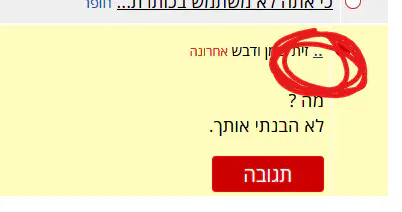 זה, לא הבנתי את הסיפור של ה2 נקודות, למה לא לכתוב שם את תוכן השאלה? (במיוחד בשאלות קצרות).
ולגופה של שאלה- לפעמים יש במחשב תקלות- ורבות מהן הפעלה מחדש מסדרת. אם זה חד פעמי אפשר להתעלם, אם זה דבר חוזר רק אז הייתי מתחיל לדאוג ולבדוק אחריות וכדו'.
..זית שמן ודבש
זה בגלל ceo .
אולי זה וירוס?
מה בגלל ceo?חופר
יכול להיות שזה וירוס ויכול להיות שלא.
יש כל מיני אנטי וירוסים טובים שמציעים סריקה בחינם
יש כל מיני אנטי וירוסים טובים שמציעים סריקה בחינם
מקשים דביקים?מתנחל בראבקאחרונה
אולי זה בגלל שהוא לחץ 5 פעמים שיפט והפעיל מקשים דבאולי זה בגלל שהוא לחץ 5 פעמים שיפט והפעיל מקשים דביקים בטעות
ספרה נוספת בחיסור בינארי?BathanF
אני רק משחק עם חיסור בינארי באמצעות המשלים של שניים, אבל הייתי רוצה להבין משהו.
כדי לבצע 11 - 9 אני מתחיל בהמרת ה-9 למספר שלילי על ידי הפיכת ה-0 ל-1 ו-1 ל-0, ואז אני מוסיף 1. ואז אני מוסיף את הסכום השלילי כדי ליצור 11 +(-9)
בינארי
00001011 +11110111 --------- 10000001000001011 +11110111 --------- 100000010
כפי שאני מבין את זה, אני פשוט מתעלם מה-MSB, אז זה הופך להיות:
0000001000000010
למה אני יכול להסיר את ה-MSB?
לפי הscaler, אני צריך להפוך את המספר השלם לחיובי ואז להוסיף את המחרוזת הבינארית עם סימן שלילי. אבל אני לא בטוח איך להשיג את זה. מישהו יכול לעזור לי? כל עזרה תתקבל בברכה. תודה
ספרה נוספת בחיסור בינארי?
אני רק משחק עם חיסור בינארי באמצעות המשלים של שניים, אבל הייתי רוצה להבין משהו.
כדי לבצע 11 - 9 אני מתחיל בהמרת ה-9 למספר שלילי על ידי הפיכת ה-0 ל-1 ו-1 ל-0, ואז אני מוסיף 1. ואז אני מוסיף את הסכום השלילי כדי ליצור 11 +(-9)
בינארי
כפי שאני מבין את זה, אני פשוט מתעלם מה-MSB, אז זה הופך להיות:
למה אני יכול להסיר את ה-MSB?
לפי ה[scaler], אני צריך להפוך את המספר השלם לחיובי ואז להוסיף את המחרוזת הבינארית עם סימן שלילי. אבל אני לא בטוח איך להשיג את זה. מישהו יכול לעזור לי? כל עזרה תתקבל בברכה. תודה
בגדול בלי להכנס לפרטים שאני לא זוכרחופר
אפשר להסיר את הMSB כי זו ההגדרה של השיטה- ונכון- מקבלים תוצאה לא מדוייקת (כמו שבחיבור 2 מספרים בעלי 3 ספרות לא תמיד התוצרה תהיה בעלת 3 ספרות)
פשוט יש 2 שיטות חיסורטוב שםאחרונה
אם להוריד לבסוף את הספרה העודפת או מההתחלה.
פלאפון חדש שננעלאפרת.
שלום, קניתי פלאפון חדש וקבעתי קו נעילה כלשהו כדי להכניס את התביעת אצבע שלי.
עבר זמן ורק עכשיו אני רוצה להתחיל להשתמש בו.
אבל בינתיים הוא נכבה,
ושכחתי לחלוטין מה קו הנעילה שבחרתי.
הוא לא נותן לפתוח עם תביעת אצבע, כי המכשיר היה מכובה.
מה אפשר לעשות?
עבר זמן ורק עכשיו אני רוצה להתחיל להשתמש בו.
אבל בינתיים הוא נכבה,
ושכחתי לחלוטין מה קו הנעילה שבחרתי.
הוא לא נותן לפתוח עם תביעת אצבע, כי המכשיר היה מכובה.
מה אפשר לעשות?
איזה טלפון זה?אנונימי12456
ואכפת לך לפרמט אותו?
Relme c33אפרת.
אז הסרטון ששלחתי מתאים גם לטלפון הזהאנונימי12456
הכפתור של הבדיקה והכיבוי זה אותו כפתור..אפרת.
ההדלקהאפרת.
אופס...אנונימי12456
התכוונתי לכפתור כיבוי וכפתור ווליום
לחיצה ארוכה?אפרת.
זה מדליק את הפלאפון ותו לאאפרת.
תנסי להדליק רגיל ואז בזמן שמופיע הלוגו של החברהאנונימי12456
ללחוץ לחיצה ארוכה על הווליום
עובד?אנונימי12456
לא..😟אפרת.
מוזראנונימי12456
מאיפה קנית את הטלפון?
Kspאפרת.
אה מעולהאנונימי12456
תלכי אליהם ותגידי שקנית מהם את הטלפון ושכחת את הסיסמה ואם הם יכולים לאפס את הטלפון, לא צריך לשלוח את זה למעבדה בשביל זה וזה גם לא אמור לעלות כסף, זה הליך של כמה דקות.
ננסה, אם אין ברירה.. תודה!אפרת.
בסוף עבד לי, עם סרטון אחר שמצאתי. תודה רבה!אפרת.אחרונה
אחרי שנכנסת למצב recoveryאנונימי12456
תרדי באמצעות כפתור הווליום של להנמיך למטה ותעמדי על השורה: Wipe data/factory reset,
לאחר מכן תלחצי על כפתור הכיבוי כדי לבחור באופציה,
לאחר מכן תרדי שוב ותעמדי על השורה: yes או factory data reset (מה שיופיע לך), ולאחר מכן שוב פעם ללחוץ על כפתור הכיבוי בשביל לבחור באופציה.
ואז זהו.
להעלות ב recovery ולפרמטמשה
כמובן אם המידע שם חסר ערך.
אין לי שם כלום בינתיים. גם לא חשבון גוגלאפרת.
אשמח להסבר מפורט.. תודה!אפרת.
הנה הסבר קטןאנונימי12456
בגדול מכבים את הטלפון ואז לוחצים על כפתור ההדלקה והכיבוי (עריכה: כפתור כיבוי וכפתור ווליום) ביחד והטלפון נכנס לrecovery, ומשם מפרמטים את הטלפון.
הנה סרטון קצר שמסביר הכול:
הסרטון הוא על טלפון של סמסונג, אם יש טלפון של חברה אחרת תגידי ואני אשלח סרטון אחר שמתאים לטלפון.
יש אינטרנט בפלאפון?חופר
אם כן אז תחכה כמה שניות וזה אמור להסתדר) אצלי תמיד בהתחלה אומר שמחובר ואין אינטרנט ואחרי כמה שניות כבר גם יש אינטרנט
כן ברורכבתחילה
לא הצליח
חיכיתי אפילו כמה דקות ויותר מחצי שעה ולא עזר.
יש לי נתונים לנייד 200 ג'יגה.
חיכיתי אפילו כמה דקות ויותר מחצי שעה ולא עזר.
יש לי נתונים לנייד 200 ג'יגה.
Ipconfig מה כתוב שם?משה
איפה אני מחפשת את זה?כבתחילה
בשורת הפקודהzoharelias
להריץ פקודה בשם CMD
(למשל ללחוץ על כפתור התחל ואז לרשום CMD)
ואז נפתח חלון טקסט שחור
ואז להקליד את המילה ipconfig
מתקבלים מספר נתונים.
האינטרנט הסלולרי שלך רגיל או מסונן?shaulreznik
לא, שום סינון..כבתחילהאחרונה
למישהו יש רעיונות איך לרוקן את gmailyosef13
בס"ד
גם לי הולך להיגמר המקום בגימייל, יש למישהו רעיונות איך לרוקן את האחסון בצורה מבוקרת?
את הדרייב רוקנתי כמעט לגמרי.
תודה רבה
אפשר לרכוש הרחבת נפח, עולה כמה עשרות שקלים לשנה.פ.א.
100GB עולה 5.90 לחודש.
70 ₪ לשנה.
לדעתי שווה את הכסף וחוסך המון המון טרחה והתעסקות של שעות, לפתוח עוד חשבונות גוגל ולהעביר ולפזר לחשבונות אחרים את הקבצים והתמונות.
70 ₪ לשנה.
לדעתי שווה את הכסף וחוסך המון המון טרחה והתעסקות של שעות, לפתוח עוד חשבונות גוגל ולהעביר ולפזר לחשבונות אחרים את הקבצים והתמונות.
אם צריך לשלם כבר הייתי עובר לפרוטוןJewice
לחפש קבצים גדוליםמשה
ולמחוק לפי זה.
לפתוח תיבה נוספת ולהעביר מיילים עם נפח גדולzohareliasאחרונה
או למחוק מיילים בנפח גדול כמו שהוזכר.
:חיפוש לפי גודל -
לכתוב בשורת החיפוש של ג'ימייל
larger:250k
(לדוגמא, אם רוצים למצוא הודעות שתופסות יותר מ 250KB )
larger:1M - הודעות שגודלן יותר ממגהבייט
לעבור מווינדווס ללינוקסבוריס
קיבלתי מחשב מגיסי מחשב ולפי מה שאני רואה עליו כתוב שווינדווס לא מופעל הוא אמר שזה יכול להיות בגלל שהווינדווס לא חוקי.
אז א מישהו יודע אם זה באמת הבעיה?
ב חשבתי על לעבור ללינוקס כי ראיתי המלצות על זה, האם זה באמת כדאי? מה היתרונות והחסרונות?
היתרונות והחסרונות של לינוקסshaulreznik
יתרונות:
1. מערכת הפעלה חינמית ומהירה (ממליץ על Linux Mint)
2. מוגנת מפני וירוסים (כי הרשאות רוט)
3. קיימת בשלל ההפצות והגרסאות, משמישה מחשבים ישנים (יש לי שני לפטופים בני 12 עם לינוקס)
חסרונות:
1. לא כל התוכנות הנפוצות קיימות בגרסת לינוקס. אם אתה עורך וידאו, למשל, שרגיל לתוכנות Adobe, תצטרך לעבור לחלופות אחרות. אין MS Office, יש את Libre Office.
2. צריך ללמוד להשתמש בלינוקס, זה לא קשה כמו לפני שני עשורים, אבל פה ושם תצטרך לגגל תשובות לשאלות ולבעיות שיצוצו
אגב, מה זה "וינדוס לא מופעל"?shaulreznik
תוכל לצרף צילום מסך?
מה זה אומר הרשאות רוט?בוריס
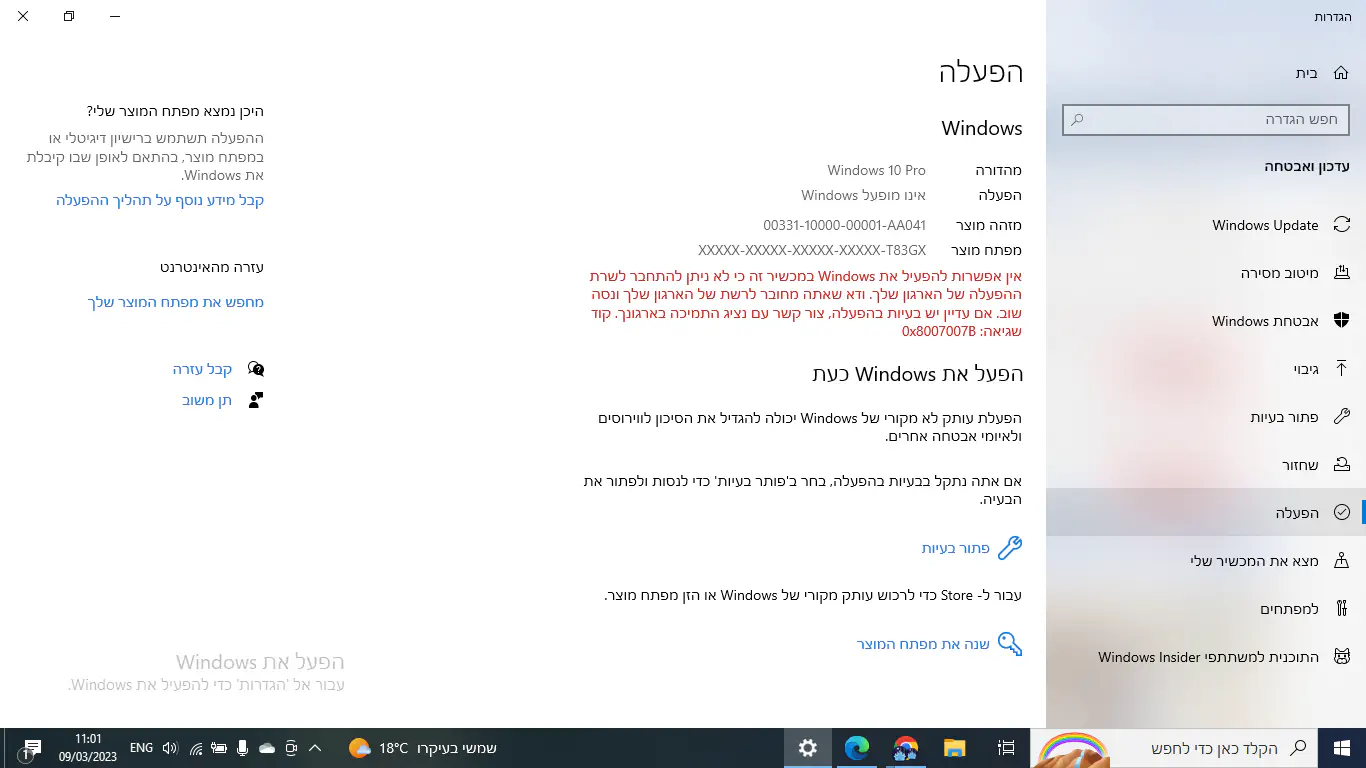
תרגמתי את ההודעה לאנגלית וגיגלתי תשובהshaulreznik
תודהבוריס
השימוש שלי במחשב הוא בעיקר ללמידה אתה ממליץ לעבור ללינוקס בכל מקרה?
גם איך מתבצע התהליך?
תודהבוריס
כן אבל לא לינוקס מינטJewice
דביאן
למה דביאן?zoharelias
למי שמתנסה בלינוקס בפעם הראשונה ומגיע מחלונות, לינוקס מינט יותר מתאימה.
יש מספר הפצות לינוקס שיותר מומלצות למתחילים משתמשי חלונות
גם ZORIN, KUBUNTU ועוד כמה מומלצות, והן לפני דביאן בלי ספק
(מה גם שרובן ממילא מבוססות על דביאן... רק בעטיפה יותר ידידותית, אז יש פה רק יתרונות ללא חסרונות).
Top 10 Linux Distributions for Windows Users in 2023
למה לא? אפילו שיתחיל עם ג'נטו...חופר
עבר עריכה על ידי חופר בתאריך י"ט באדר תשפ"ג 16:16
הייתי זמן עם מינט, עם מנג'רו ועם אובונטו, בנתיים הכי הייתי מרוצה מהפצות מבוססות אובונטו, לאחרונה עברתי לBudgie, בעיקרון אפשר לעבור יחסית בקלות בין ההפצות האלה- Ubuntu flavours | Ubuntu קצת לומדים מה לחפש בגוגל ואז זה כמה שורות בטרמינל ועוברים גרסה.
"כמה שורות בטרמינל"...zoharelias
אתה מכיר את היכולת הטכנית של השואל?
אם כן אז אין בעיה.
לא, לכן אמרתי עם מה להתחיל ושאח"כ קצת לומדיםחופר
ומבינים כמה זה פשוט.
מה שכתבתי על ג'נטו היה בציניות כתגובה למה שנכתב על להתחיל עם דביאן.
בגדול אני חושב שלמשתמש הפשוט כדאי להתחיל עם אובונטו כלשהו (ההבדל העיקרי ביניהם הוא שולחן העבודה).
הרשאות root11111
בלינוקס בתור צורת ההפעלה הנורמלית לא משתמשים במשתמש בעל הרשאות מלאות במערכת אלא במשתמש בעל הרשאות מוגבלות ורק כאשר יש צורך מיוחד מעלים להרשאות root (מנהל המערכת).
אני אישית לא חושב שזה הגורם העיקרי שוירוסים ללינוקס כמעט לא קיימים.
הגורם שלדעתי יותר משמעותי זה שהתקנת תוכנות בלינוקס במצב בריא היא כמעט ורק מתוך מאגרי תוכנה מבוקרים,
כלומר לא מחפשים באינטרנט מורידים ומתקינים דברים שלא ברור מה יעשו למחשב, אלא מה מחפשים בתוך מאגר החבילות הרשמי ומתקינים ממנו חבילה של התוכנה ותלויותיה.
אגב, בשנים האחרונות ווינדוס מעתיקים את שני הדברים האלו (מאגר תוכנות וניהול הרשאות)
אני מאוד ממליץ על שימוש בלינוקס, ומשתמש בה במחשבים שלי באופן בלעדי כבר מעל 10 שנים.
קצת בילבלתם אותיבוריס
איזה לינוקס הוא הכי כדאי?
זהshaulreznik
Linux Mint 21.1 "Vera" - Linux Mint
הממשק שלו דומה לוינדוס:
אם יהיו לך שאלות לגבי התקנה וכו' וכו', תשאל אותי בפרטי
אין תשובה חד משמעית (אחרת לא היו כ"כ הרבהחופראחרונה

לא לגמרי קשור לפורום.. אבל בטח יש כאן חכמים באלגברבאר מרים
ניסיתי לפתור תרגיל עם הבן שלי
בסוף הגענו למשוואה: 2 בחזקת x שווה 5. (אני בטוחה שעד השלב הזה חישבנו נכון.. עוד זוכרת משהו מהבגרות במתמטיקה.. )
אני לא זוכרת איך מתקדמים הלאה - איך מוצאים את x מכאן?
בסוף הגענו למשוואה: 2 בחזקת x שווה 5. (אני בטוחה שעד השלב הזה חישבנו נכון.. עוד זוכרת משהו מהבגרות במתמטיקה.. )
אני לא זוכרת איך מתקדמים הלאה - איך מוצאים את x מכאן?
שואלים את Chat GPTshaulreznik
2**x = 5. Solve this.
To solve this equation, we need to use logarithms.
Taking the logarithm (with base 2) of both sides, we get:
x = log2(5)
Using a calculator, we can approximate this value to be:
x ≈ 2.32
Therefore, the solution to the equation 2^x = 5 is approximately x = 2.32.
To solve this equation, we need to use logarithms.
Taking the logarithm (with base 2) of both sides, we get:
x = log2(5)
Using a calculator, we can approximate this value to be:
x ≈ 2.32
Therefore, the solution to the equation 2^x = 5 is approximately x = 2.32.
לשאול את Chat GPT דבר כזה זה כמו להביא מנוףחופר
בשביל להזיז אבן לגו... (כמובן לא מנוף של לגו)
שואלים את symbolabחופר
הוא לומד כעת לוגריתמים?פצל-ש
2 בחזקת x שווה 5
X שווה לוג(5) חלקי לוג(2).
בכל מחשבון יש פונקציית לוג.
——-
10 בחזקת 2 שווה 100
לוג(100) חלקי לוג(10) שווה 2
2 בחזקת 5 שווה 32
לוג(32) חלקי לוג(2) שווה 5
פונקציית log
X שווה לוג(5) חלקי לוג(2).
בכל מחשבון יש פונקציית לוג.
——-
10 בחזקת 2 שווה 100
לוג(100) חלקי לוג(10) שווה 2
2 בחזקת 5 שווה 32
לוג(32) חלקי לוג(2) שווה 5
פונקציית log
תודה..באר מרים
לא. (בחור ישיבה שלא עושה בגרויות אבל נהנה ממתמטיקה בזמנו הפנוי.. יש חיות כאלה..)
הנושא של לוגריתמים נמחק לי לחלוטין מהראש...באר מריםאחרונה
בכל זאת סיימתי את הבגרות במתמטיקה לפני יותר מ 25 שנים..