
נעלמה. גם כשהאינטרנט פתוח, לא מופיע כלום בשורת המשימות. מישהו?
מכתב פתיחה
שורת המשימותdoni
תעשי קליק ימני על שורת המשימות ותחפשי משו בהגדרות ? אוליחנטרישש
לא עובדdoni
אממ עובד לי לא רואה בזה שימוש כלכך .........חנטרישש
הגדרות>כליםנוספים>חחח הרחבות ( שכחתי) >שם יש אפשרויות ........תעשי נגיד הכל כן אחרי זה מופיע בשורת המשימות ( איפה שתמיד מחפשים) הסמל .........לא מצאתי סמיילים רק אפשרות לשתף סמיילי שלי או לי שמואל יסביר בהמשך מצאתייייייייייייייייי לא בפורום אבל בשיחה אישית גדוללללללללללללל
וואי איך זה הגיע לפה ^^^^^^^^^^^חנטרישש
לא הבנתי.רואים בתמונה את שורת המשימותאגוז מוסקט
כל הסמלים נעלמו משורת המשימותdoni
תנסה לעדכן דריוריםאגוז מוסקטאחרונה
בס"ד
פתרון זמני:
מנהל המשימות - תהליכים - explorer.exe - סיים תהליך - יישומים - משמימה חדשה - explorer.exe.
לא לגמרי ברור מה גורם לבעיה אבל מצאתי תשובה שכדאי שתנסה אותה: (בין השאר כתוב לנסות לעדכן דריורים)
"
SpiritX MS MVP replied on


Hi,
System corruption or something loading could be blocking the Icons occasionally.
References to Vista also apply to Windows 7.
What antivirus/antispyware/security products do you have on machine? Include any you have EVER
had on this machine including those you uninstalled (they leave remnants behind which can cause
strange issues).
----------------------------------------------------
Do these :
Try these to clear corruption and repair/replace damaged/missing system files.
Start - type this in Search Box -> COMMAND find at top and RIGHT CLICK - RUN AS ADMIN
Enter this at the prompt - sfc /scannow
How to Repair Windows 7 System Files with System File Checker
http://www.sevenforums.com/tutorials/1538-sfc-scannow-command-system-file-checker.html
How to analyze the log file entries that the Microsoft Windows Resource Checker (SFC.exe) program
generates in Windows Vista cbs.log
http://support.microsoft.com/kb/928228
Also run CheckDisk so we can rule out corruption as much as possible.
How to Run Disk Check in Windows 7
http://www.sevenforums.com/tutorials/433-disk-check.html
==========================================
After the above :
How to troubleshoot a problem by performing a clean boot in Windows Vista or
Windows 7
http://support.microsoft.com/kb/929135
Use Advanced Tools to Troubleshoot Performance Problems in Windows 7 http://www.howtogeek.com/howto/6152/use-advanced-tools-to-troubleshoot-performance-problems-in-windows-7/
Problems with overall system speed and performance
http://support.microsoft.com/default.aspx/gp/slow_windows_performance?p=1
How to troubleshoot performance issues in Windows Vista
http://support.microsoft.com/kb/950685
Optimizing Microsoft Windows Vista Performance
http://support.microsoft.com/kb/959062
To see all that is loading bootup - wait a few minutes without doing anything - then Right Click
TaskBar - Task Manager - take a look at Appplications - Processes - Services - this is a quick
reference (if you have a little box on Lower Left - Show for All Users then check that).
How to Change, Add, or Remove Startup Programs in Windows 7
http://www.sevenforums.com/tutorials/1401-startup-programs-change.html
A quick check to see which are loading is Method 2 there - using MSCONFIG then post a list of
those here.
--------------------------------------------------------------------
Tools that should help :
Process Explorer - Free - Find out what files, registry keys and other objects processes have open,
which DLLs they have loaded, and more. This uniquely powerful utility will even show you who owns
each process.
http://technet.microsoft.com/en-us/sysinternals/bb896653.aspx
Autoruns - Free - See what programs are configured to startup automatically when your system boots
and you login. Autoruns also shows you the full list of Registry and file locations where applications can
configure auto-start settings.
http://technet.microsoft.com/en-us/sysinternals/bb963902.aspx
Process Monitor - Free - Monitor file system, Registry, process, thread and DLL activity in real-time.
http://technet.microsoft.com/en-us/sysinternals/bb896645.aspx
There are many excellent free tools at Sysinternals
http://technet.microsoft.com/en-us/sysinternals/default.aspx
WhatsInStartUP - Free - This utility displays the list of all applications that are loaded automatically
when Windows starts up. For each application, the following information is displayed: Startup Type (Registry/Startup Folder), Command -Line String, Product Name, File Version, Company Name,
Location in the Registry or file system, and more. It allows you to easily disable or delete unwanted
programs that runs in your Windows startup.
http://www.nirsoft.net/utils/what_run_in_startup.html
There are many excellent free tools at NirSoft
http://www.nirsoft.net/utils/index.html
Window Watcher - Free - Do you know what's running on your computer? Maybe not. The Window
Watcher tells all, reporting every window created by every running program, whether the window
is visible or not.
http://www.karenware.com/powertools/ptwinwatch.asp
Many excellent free tools and an excellent newsletter at Karenware
http://www.karenware.com/
===========================================
Consider this an absolute must - manually updating your drivers.
Vista and Windows 7 love updated drivers so here is how to update the major ones.
This is my generic how to for proper driver updates :
This utility makes it easy to see which versions are loaded :
DriverView - Free - utility displays the list of all device drivers currently loaded on your system.
For each driver in the list, additional useful information is displayed: load address of the driver,
description, version, product name, company that created the driver, and more.
http://www.nirsoft.net/utils/driverview.html
For Drivers check System Maker as fallbacks and Device Maker's which are the most current.
Control Panel - Device Manager - Display Adapter - write down the make and complete model
of your video adapter - double click - Driver's tab - write down the version info. Now click UPdate
Driver (this may not do anything as MS is far behind certifying drivers) - then Right Click -
Uninstall - REBOOT this will refresh the driver stack.
Repeat that for Network - Network Card (NIC), Wifi, Sound, Mouse and Keyboard if 3rd party
with their own software and drivers and any other major device drivers you have.
Now go to System Maker's site (Dell, HP, Toshiba as examples) (as rollback) and then Device
Maker's site (Realtek, Intel, Nvidia, ATI as examples) and get their latest versions. (Look for
BIOS, Chipset and software updates at System Maker's site while there.)
Download - SAVE - go to where you put them - Right Click - RUN AD ADMIN - REBOOT after
each installation.
Always check in Device Manager - Drivers tab to be sure the version you are installing actually
shows up. This is because some drivers rollback before the latest is installed (sound drivers
particularly do this) so install a driver - reboot - check to be sure it is installed and repeat as
needed.
Repeat at Device Makers - BTW at Device Makers DO NOT RUN THEIR SCANNER - check
manually by model.
Manually look at manufacturer's sites for drivers - and Device Maker's sites.
http://pcsupport.about.com/od/driverssupport/ht/driverdlmfgr.htm
Installing and updating drivers in 7 (updating drivers manually using the methods above is preferred
to ensure the latest drivers from System maker and Device makers are found)
http://www.sevenforums.com/tutorials/43216-installing-updating-drivers-7-a.html
If you update drivers manually then it is a good idea to disable Driver Installations in Windows
Updates, this leaves Windows Updates ON however it will not install drivers which will usually be
older and cause issues. If Updates suggests a new driver then HIDE it (Right Click on it) and then
go look for new ones manually if you wish.
How To Disable Automatic Driver Installation In Windows Vista - Drivers
http://www.addictivetips.com/windows-tips/how-to-disable-automatic-driver-installation-in-windows-vista/
http://technet.microsoft.com/en-us/library/cc730606(WS.10).aspx
===========================================
Refer to this thread for many more excellent tips however be sure to check your antivirus
programs, update major drivers and BIOS, and also troubleshoot with the cleanboot method
first.
Performance and Maintenance tips
http://social.answers.microsoft.com/Forums/en-US/w7performance/thread/19e5d6c3-bf07-49ac-a2fa-6718c988f125
Hope this helps.
Rob Brown - MS MVP - Windows Desktop Experience : Bicycle - Mark Twain said it right.
Rob Brown - Microsoft MVP - Windows Experience : Bicycle - Mark Twain said it right.
מחפש לקנות מקרן מאליאקספרסמחפש אמת
אשמח להדרכה
איזה נתונים צריך לבדוק?
רזולוציה, לומןמשה
ומערכת הפעלה (אנדרואיד או רק hdmi)
כמה לומן צריך בשביל צפייה נורמלית?מחפש אמת
לי יש 6000 וזה אחלה בשביל סלוןמשה
מה התקציב?תמיד בבטחה
אני קניתי מקרן פעמיים. אחד ב140 שקל שהיה סבבה, לא רזולוציה הכי ולא ממש מאיר, אבל היה נחמד - הרזולוציה לא כזה הפריעה לי ולא היה צריך להחשיך לגמרי בשביל לראות, מספיק לסגור וילונות ואת האור. מאוד נהניתי ממנו.
ואז התחתנתי ובעלי לא היה מרוצה מהרזולוציה וכו' אז הזמנו אחד חדש ב140 דולר, גם מאלי, והוא מטורף, אנחנו בכיף רואים איתו דברים כשהאור דלוק וזה סבבה לגמרי, והרזולוציה מצוינת.
אני יכולה לשלוח קישורים לשניהם אם אתה רוצה
שאלה של בורהכולנה
צריך לחבר למחשב כדי לראות?
יש אפשרות שיקרין מה שבטלפון?
בשניהם זה מקרן חכםתמיד בבטחה
אפשר להתקין עליו אפליקציות, ואפשר לחבר גם כבל למחשב. טלפון זה יותר מסובך
יש גם עוד שיטהמשה
להתקין שם תוכנה שיודעת לנגן לינקים (VLC סטייל, אבל יש עוד) ואז לתת לו לנגן קובץ מתוך מחשב/טלפון אחר ברשת עם HTTP.
דורש קצת ידע מתקדם, אבל אפשרי.
ראיתי שגם home assitant מאפשר לדחוף קבצים למקרן מרחוק (וגם לסתם טלוויזיה).
אשמח אם תשלחי תודה רבהמחפש אמת
אני לא מוצאת אותם...תמיד בבטחהאחרונה
אבל יש עכשיו באושר עד מקרנים כאלה, שווה לבדוק
מכירים אפליקציה/אתראשר ברא
שאפשר לכתוב בו עם הכתב יד שלי?
יש אייפד וכל מה שצריך לטובת האירוע..
לכתוב ויזהה את הטקסט?משה
או לכתוב ושיששאר ציור?
לכתוב ושזה יהיה כמו הכתב שליאשר ברא
אבל שיהיה אפשר להוציא מזה טופס של מכתב לדוג'
אז קודם תכתבי פשוט על צייר תמונותמשה
ואחר כך לזרוק את התוצאה ל LLM (כמו CHATGPT ) שיקרא את זה.
לא לאאשר ברא
הבנתי שיש אפליקציה/ אתר
שכותבים כל אות בנפרד ואז זה נשמר ואפשר לכתוב.
כלומר פונט שהוא כתב היד שלך?מרגולאחרונה
שתוכל אח"כ להקליד במקלדת וזה יכתוב כל אות בכתב שלך?
ניסיתי בעבר ויצא די זוועה
כי אתה צריך שהאותיות יהיו בגודל מאוד דומה בשביל שיראה טוב
לכתוב כל אחת ממש במרכז המלבן כדי שהמרווח בין האותיות יהיה שווה
וכן הלאה
אני התייאשתי… אבל תנסה
אולי השתמשתי ב ifont
לא לגמרי זוכרת
שאלת את Gemini?פ.א.
הוא ענה לי לצורך שלך, להפוך את כתב היד שלך לפונט במחשב:
אם אתה מחפש להפוך את כתב היד הייחודי שלך לפונט דיגיטלי (קובץ TTF או OTF) שתוכל להקליד איתו במחשב, יש כמה כלים מעולים ופשוטים שעושים בדיוק את זה. רובם עובדים בשיטה דומה: מורידים דף שורות מיוחד (טמפלייט), כותבים עליו את האותיות, סורקים או מצלמים אותו, והאתר הופך את זה לפונט.
הנה האפשרויות המובילות והמומלצות ביותר:
### 1. Calligraphr (המומלץ ביותר)
זהו השירות הפופולרי והנגיש ביותר כיום (היורש של אתר נוסטלגי בשם MyScriptFont).
* **איך זה עובד:** אתה נרשם, בוחר את קבוצת האותיות שאתה צריך (תומך בעברית בצורה מלאה), מוריד קובץ PDF או PNG, וממלא אותו בכתב ידך (מומלץ בעט שחור וברור). לאחר מכן, מעלים את הצילום לאתר, והוא מייצר קובץ פונט תוך דקות.
* **גרסה חינמית:** מאפשרת ליצור פונט עם עד 75 תווים (מספיק בהחלט לעברית, כולל אותיות סופיות, מספרים וסימני פיסוק בסיסיים).
* **יתרון בולט:** יש לו תכונה (בתשלום) של "רנדומיזציה", שמאפשרת לכתוב כמה גרסאות לכל אות כדי שהפונט ייראה טבעי ואנושי יותר ולא אחיד מדי.
### 2. Fontifier
כלי ותיק ופשוט מאוד שעושה עבודה טובה.
* **איך זה עובד:** מורידים תבנית, כותבים, סורקים ומעלים.
* **מחיר:** האתר מאפשר לך לראות תצוגה מקדימה (Preview) של הפונט שלך בחינם, אבל כדי להוריד את הקובץ לשימוש במחשב יש תשלום חד-פעמי קטן (בסביבות $9).
### 3. FontForge (למתקדמים)
אם אתה מחפש שליטה מוחלטת, דיוק מקצועי לחלוטין, ורוצה לעשות הכל בחינם בלי מגבלות.
* **איך זה עובד:** זוהי תוכנת קוד פתוח (Open Source) רבת-עוצמה שמתקינים על המחשב. אתה יכול לצייר את האותיות בתוכנת גרפיקה (כמו Illustrator) או לסרוק אותן, ואז לייבא אותן אות-אחר-אות לתוך התוכנה ולכוונן את הריווחים בצורה מושלמת.
* **חיסרון:** עקומת למידה חדה יותר – היא פחות ידידותית למשתמש הממוצע ודורשת קצת סבלנות.
### 💡 טיפים להשגת תוצאה מושלמת:
* **השתמש בעט נכון:** כתוב עם עט שחור, עדיף עט פיילוט או טוש דק (Fineliner) עם קו בעל עובי אחיד. עטים כחולים או עפרונות פחות עוברים טוב בסריקה.
* **שמור על הפרופורציות:** שים לב לקווים המנחים בטמפלייט. אותיות כמו ן', ך' או ץ' צריכות לרדת מתחת לשורה, ואותיות כמו ל' צריכות לעלות מעליה.
* **צילום/סריקה איכותיים:** אם אתה מצלם מהטלפון ולא סורק, ודא שיש תאורה חזקה (עדיף אור יום תחת חלון), שהדף ישר לחלוטין ושאין צללים של הטלפון על הדף.
אם המטרה שלך היא פשוט פונט עברי אישי ויפה בלי להסתבך, **Calligraphr** היא בהחלט נקודת ההתחלה הטובה ביותר עבורך.
מכירה ומשתמשת הרבהשושיאדית
DocHub של גוגל.
אני משתמשת לצורך חתימה ע מסמכים באונליין.
מעלה את הטופס לדרייב, ואז פתיחה באמצעות DocHub.
יש שם כלי של עט / עיפרון וכו'.
זה נראה ככה

פריצת חסימהיצחק מזרחי
איך אפשר לפרוץ הגנת בלוק פון (blockphone) ?
דחוף!!!! ההגנה הזאת תוקעת לי את הטלפון...
ככל הנראה כדי לפרוץ את ההגנהנפשי תערוג
תצרך לצרוב רום חדש לטלפון.
אם אתה יודע להתעסק עם זה. מצויין.
אם לא, תלמד. יש הרבה מידע באינטרנט (ועל כמה שזה עלול להיות מסוכן= להשבית את הטלפון)
אם אין לך כוח.
פשוט לקנות מכשיר חדש.
תודהיצחק מזרחי
יש לי s24 ומסתבר שזה בכלל הגנה של מושגח פלוס... אני נכנס לאפליקציות בטלפון וזה יוצא לי מהן לפחות 2 פעמים עד שזה לא יוצא אוטומטית... הטלפון איטי למרות שהוא חדש לגמרי
לא כל כך מובןנפשי תערוגאחרונה
אם אתה ילד שההורים שלו קנו לו את הטלפון עם הגנה או מישהו שקנה לעצמו טלפון עם הנגנה והחליט שהוא לא צריך.
אם זה המקרה הראשון, תחכה כמה שנים. תגדל. תוכל לקנות לעצמך טלפון בלי הגנה.
אם זה המקרה השני,
א. למה עשית את זה?
ב. חנות הטלפונים שקנית ממנה אולי יכולה לעזור.
ג. יש דרכים מהירות ולאפס מכשיר כך שהוא יהפוך להיות ללא הגנה
תבוא לחנות ויסירו לך את ההגנהעזריאל ברגר
לחנות שממנה קנית את המכשיר.
מניסיון שלי.
שווה לעשות קידום אורגני לאתר חנות שלי?רחלי ווינר
מצד אחד המפרסמים טוענים ששווה להשקיע בזה תקופה ואז אפשר להפסיק והאתר מפורסם, מצד שני הם לא מוכנים להתחייב שהפרסום יצליח. למישהו יש ניסיון בזה?
אם את מאמינה במוצרים ובאתרזיויק
שווה בדיקה בקמפיין ניסוי ואז תעשי שיקול אם להמשיך.
שיווק זה הרבה ניסוי וטעיה וחבל לשפוך הרבה כסף מיד.
SEO מתחיל להראות ערך אחרי 3 חודשים בערךמשה
ולפעמים גם חמישה-שישה.
אם זה לא שאלה שבאה לחכות לתגובה עם פרסומת אלא שאלה אמיתית, יש לי "קצת" נסיון בזה בתור CTO של כמה פבלישרים.
ובפינת הטכנופוביה שלנו להיום..אשר ברא
אתם יודעים איך מוחקים חשבון מייל?
מייל של גוגל?פצל"פ
את רוצה מהסמרטפון או מהמחשב?
כןאשר ברא
בעיקרון עדיף מהמחשב.. אבל מה שיותר קל
אממפצל"פ
אני יכול לבדוק לגבי המחשב מחר
בסמרטפון זה הולך ככה
את נכנסת לגימייל (או כל אפליקציה אחרת של גוגל שיש בה חשבון גוגל) ובצד שמאל למעלה יש עיגול עם האות הראשונה של השם שלך או תמונת פרופיל של חשבון גוגל אם יש לך
את לוחצת על זה ואז על "ניהול החשבון שלך בגוגל"
ואז יפתח לך תפריט, את לוחצת על "נתונים ופרטיות"
גוללת להכי למטה ושם יש לך אופציה מחיקת חשבון גוגל שלך
ומשם את מתקדמת לפי מה שיופיע לך
תודה רבה פצל"פ עזר לי מאוד!אשר ברא
אנחנו בעידן הבינה המלאכותיתshaulreznik
שואלים את ג'מיני ומקרים תשובה מפורטת תוך שנייה.
מוחקים או מתנתקים?חופר
את מודעת לזה שזה אומר שמישהו יכול להירשם במקומךמשה
ולקבל מיילים שהיו מיועדים אלייך עד עכשיו?
הוראות הסבירו לפניי.
לא. Gmail. לא משחררים כתובותקפיץ
וואלהזיויקאחרונה
כן.. אבל אני רואה שכבר הסבירומבקש אמונה
הפוסט מיועד בעיקר למשהפ.א.
ששיתף אותנו בעבר על שעון שהוא פיתח בבית, מוצג על גבי מסך.
נתקלתי בפיתוח אחר מעניין מאוד. שעון שמציג את השעה במילים בעברית עם ניקוד.
*** עדכון.. הפתעתם אותי מאוד, תודה רבה. שמח מאוד שיש מי שהתחבר לרעיון. אני בודק איך אפשר להביא כמות לכולם בבת אחת, או לא יודע, משהו אחר שיאפשר לכולם לראות את השעה במילים**
שעון המילים!
חצות. המילה הזו יודעת משהו שהספרות 00:00 לעולם לא יבינו. "ארבע לפנות בוקר" מרגישה אחרת מ-04:00. "רבע לשבע" נושאת איתה ריח של ערב, של סיום יום עבודה, של מעבר. מחוגים וספרות מדווחים. המילים נושאות סיפור.
הרעיון הזה רודף אותי הרבה זמן, מתחילת המילניום למעשה.
ניסיתי לבנות את השעון הזה פעמיים ונכשלתי פעמיים. בפעם הראשונה האלקטרוניקה ניצחה אותי, ובפעם השנייה המסך. ניסיתי לגייס שותפים פוטנציאליים שניקרו בדרכי אבל הם היו חסרי מעוף וצרי מחשבה ונכשלו להבין את הברור מאליו, למה לעזאזל לכתוב את השעה במילים. ואם אני מדרג את הרעיונות שלי לפי פוטנציאל כלכלי? בואו נגיד שהשעון לא נכנס לעשירייה הפותחת. אז לשכור מישהו גם ירד מהאפשרויות.
זמן רב חלף. ואז, לפני כמה שבועות, האלגוריתם הנבון של עלי אקספרס הפגיש אותי עם מסך של דיו דיגיטלי. E-ink. קנבס לבן, שקט, מינימליסטי. המסך שהשעון הזה חיכה לו כל השנים. האנשים הטובים של מחוז שנזן חיברו לו מראש ארדואינו וסוללה ומה שצריך. כל מה שנשאר זה לשכנע אותו להגיד את השעה.
ההמשך היה אמור להיות מאוד פשוט, אם לא הייתי די עקשן בענייני טיפוגרפיה Kerning וניקוד, שהנוכרים ימ"ש לא היטיבו לממש בספריות הלועזיות שלהם. כאן בא לעזרי חברנו קלוד קוד, שלעס את המשימה הנוקדנית בחריצות, סעיף-סעיף, ואפילו מצא ותיקן באג בספרייה המקורית של היצרן שגרם לאותיות על המסך להתחלף בכיעור רב, וקלוד החזיר אותן להתחלף מעדנות, כמו שמתאים לשעון ששוקל מילים.
אז עכשיו, אחרי עשרים שנה, יש לי שעון מילים על המדף. אני מציץ אליו בלילה והוא לוחש "רבע לחמש לפנות בוקר", ואני מחייך אליו מתוך השינה.
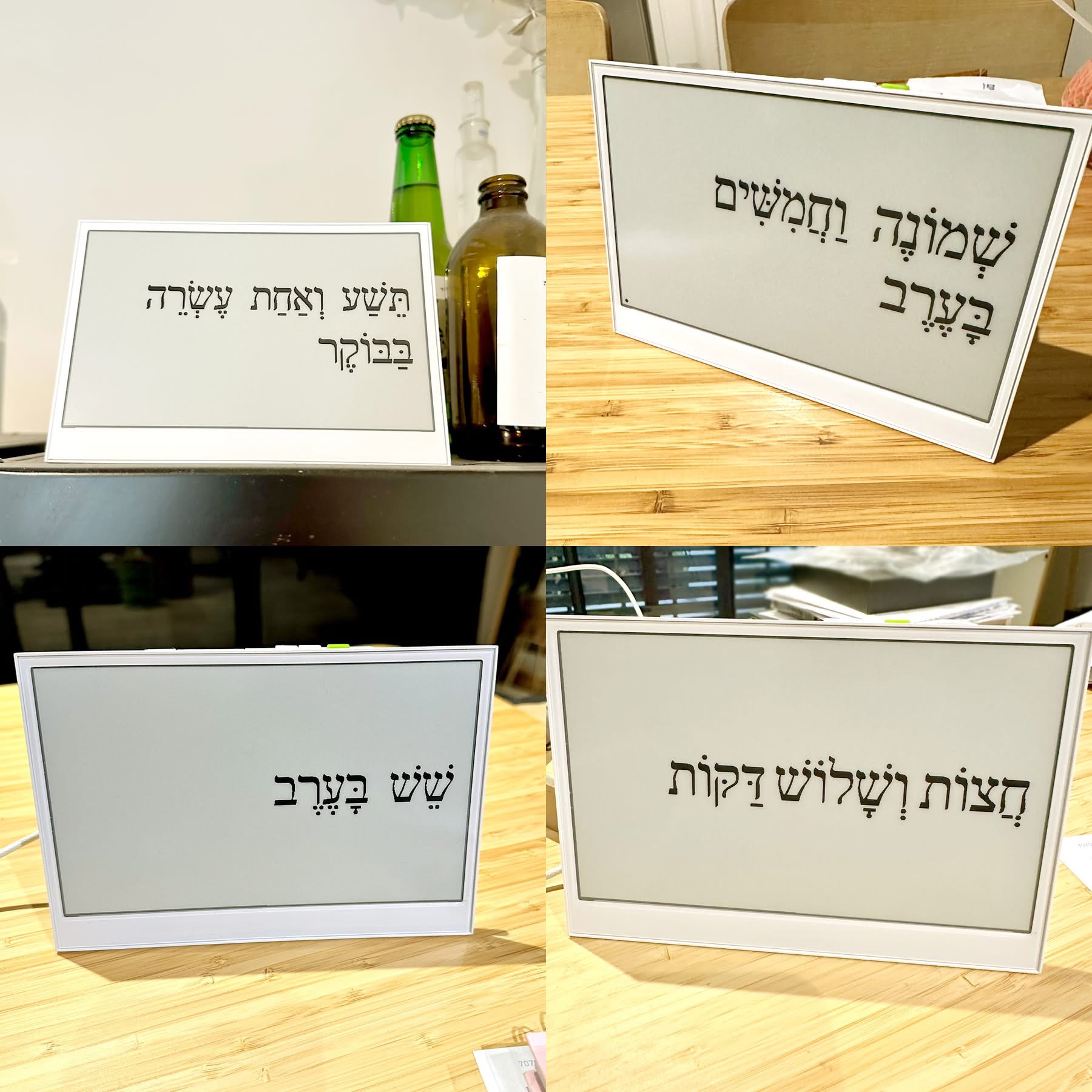
כן 😃משה
ראיתי את השעון שלו והוא חמוד ממש.
גדול, כל הכבוד! ועכשיו -zoharelias
לפתוח גיטהב על הפרוייקט (אם לא פתחת כבר  )
)
יש אפשרות לאשכנזיםחתול זמני
בָּעָרֶב?
לאשכנזים ג'ינג'ים 🐈פ.א.
אני חתול חום־שיער!חתול זמניאחרונה
ראוטר -התייעצותמחפש אמת
התחברנו בבית לסיבים אופטיים של פרטנר והחלטנו לקנות ראוטר ולא לשלם חודשי
הטכנאי של פרטנר המליץ על הדגם הזה
ראוטר TP Link AC1900 Wireless MU MIMO WiFi 5 Router Archer
לפי הצאט זה לא מספיק טוב בגלל שזה רק wifi 5 מי צודק?
השימוש הוא לא כבד בעיקר גלישה רגילה קצת צפייה אבל לא שידור חי וזומים
Wifi5 מצויין לשימושים ביתיים רגילים. הטכנאי צודק.פ.א.
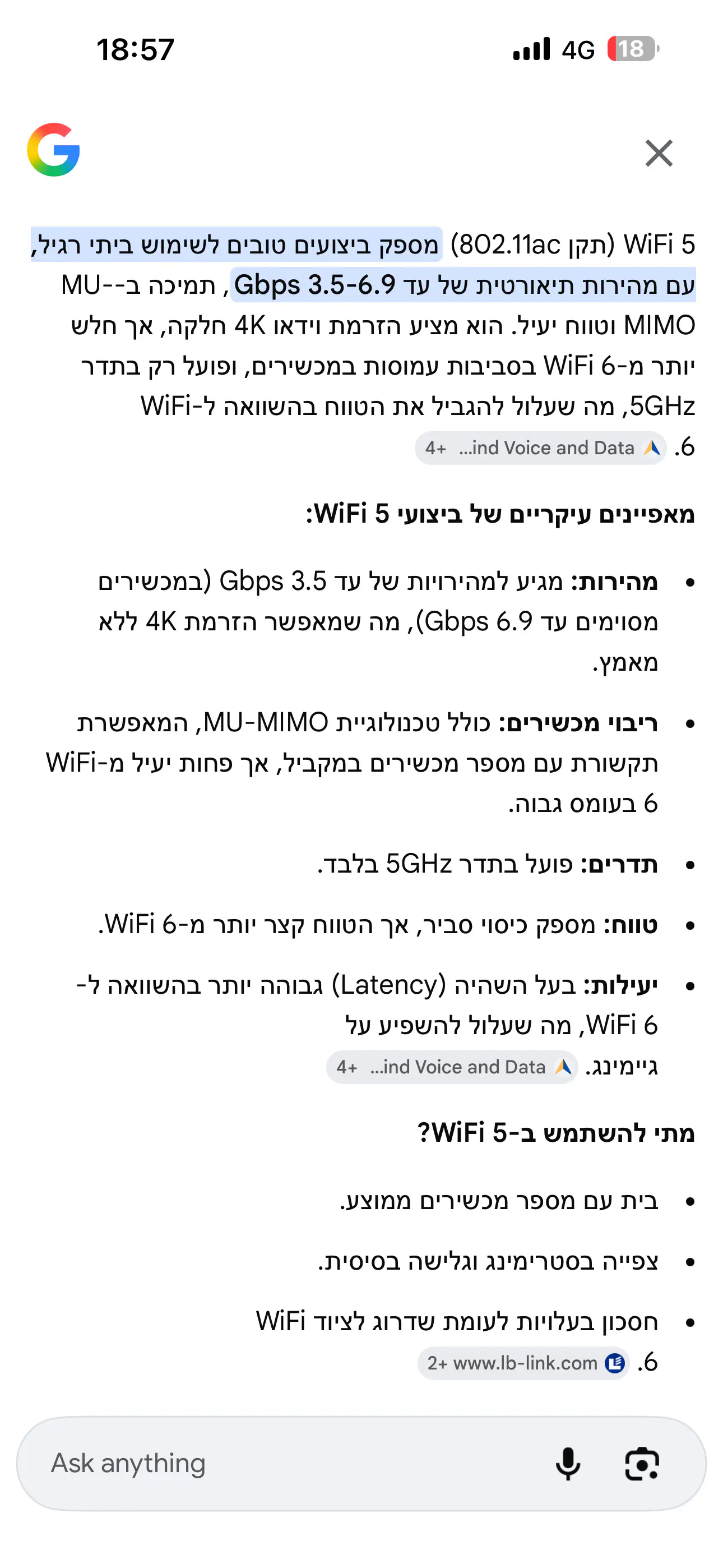
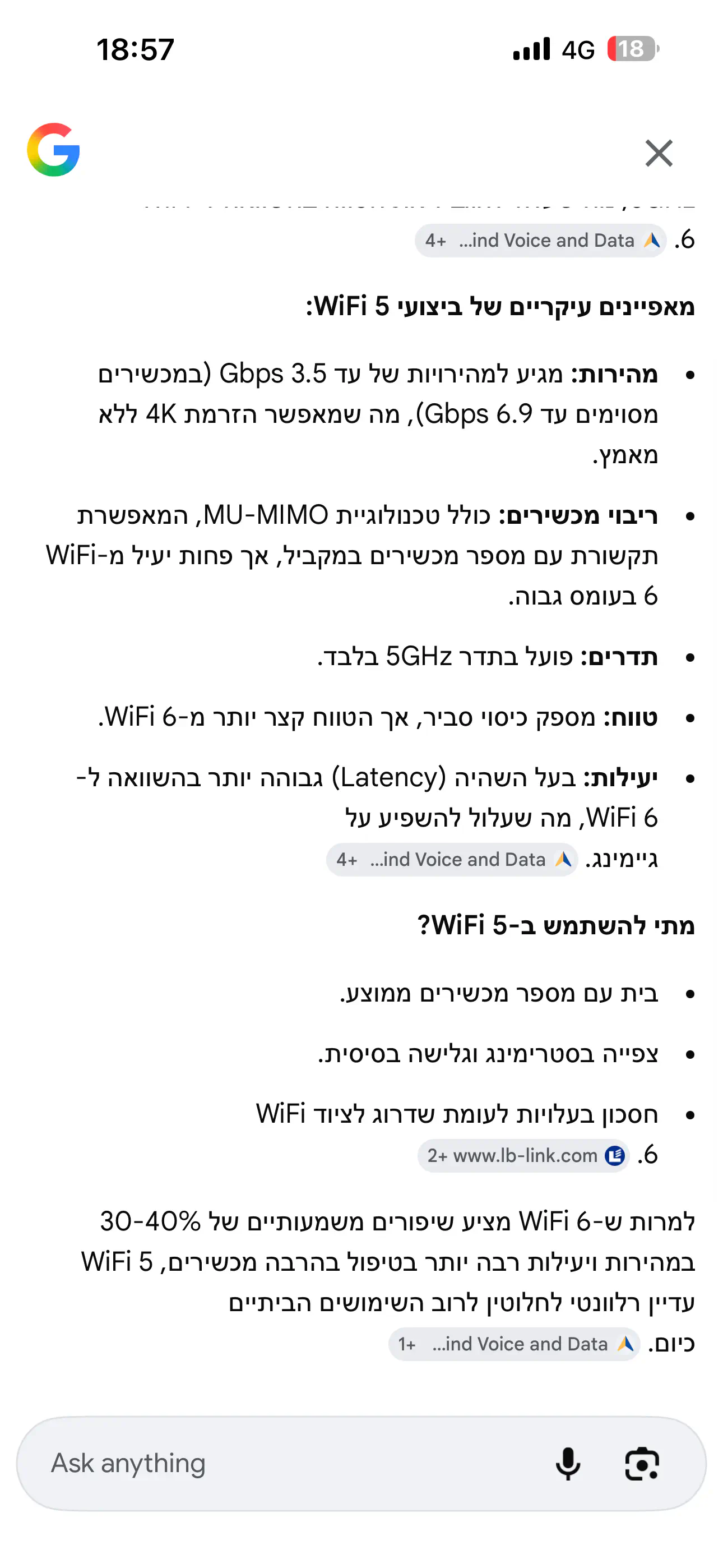
מוסיף עוד נקודה טכניתפ.א.
באופן נורמלי וטבעי, בהרבה דירות ובתים ה WiFi מהראוטר לא מגיע לכל חדרי הבית.
זו הפיזיקה - גלי רדיו בתדרים גבוהים לא עוברים דרך קירות. בטח לא לממ"ד, שעשוי מבטון מאוד עבה עם רשתות ברזל מסיביות בתוך הקירות.
ואז משתמשים בבית בפתרונות נוספים - מגדילי טווח במקרה הפשוט, או בפתרונות mesh בדירות גדולות. ואם משתמשים ב mesh, במילא מחברים את הציוד הראשי של ה mesh בחיבור קווי לראוטר, ואז אין משמעות לביצועי ה WiFi של הראוטר כי החדרים שניזונים מה mesh לא "רואים" את הראוטר.
תודה רבה על התשובה המפורטתמחפש אמת
לגבי המרחק הראוטר יעמוד במקום ממש קרוב לאזורים שבשימוש
לא כל המכשירים תומכיםפצל"פ
יש מכשירים שקולטים רק רשתות של 2.4GHz
אז לשיקולך
מחשבים ניידים וסמרטפונים שהם יחסית חדשים כן יתמכו
אבל ישנים יכול להיות שלא
ויש גם מדפסות אלחוטיות שלא תומכות ב5GHz
ברור שהראוטר תומך בשני התדריםפ.א.
מדוע חשבת שתומך רק ב 5GHz?
אגב, גם מצלמות אבטחה עובדות על 2.4GHz
הוא תומך בו זמנית בני התדרים או שצריך לבחור?מחפש אמת
בו זמנית. שניהם עובדים במקביל.פ.א.
כל תדר והמאפיינים שלו. רשום בקישור שהבאת.
זה מה שהai שהבאת כתבפצל"פ
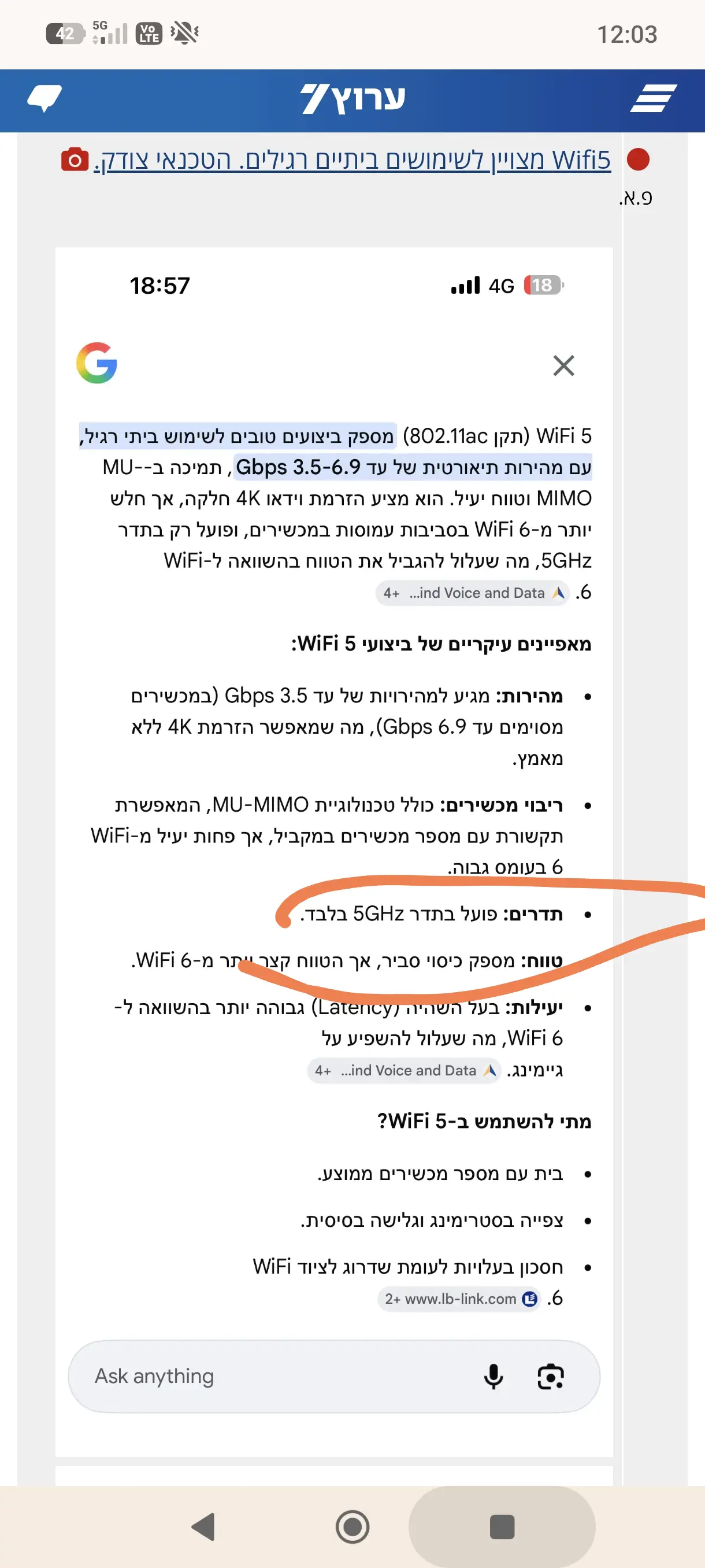
נעשה בקצרה סדר בפרטים הטכניים של ראוטר ו wifiפ.א.
יש את תקן ה WiFi הבסיסי, מזה שנים רבות מאוד, תדר 2.4GHz.
התדר הזה קיים עוד מהדור הראשון של אינטרנט אלחוטי.
אגב, התדר הזה הוא לא רק ל WiFi. גם מכשירי מיקרוגל פועלים בו.
התדר הזה עובר באופן סביר קירות, אפשר לקלוט WiFi של השכנים בתדר הזה… (מה שבעצם גורם להפרעות רדיו הדדיות בין רשתות wifi קרובות בדירות סמוכות), והוא מאופיין בביצועים בינוניים של קצב נתונים.
עם השנים פותחה טכנולוגיית WiFi נוספת, מעל לבסיסית, להעברת נתונים בקצבים מאוד מהירים, מוכרים בכינוי WiFi 5, WiFi 6, WiFi 7.
(היה גם ישן יותר, WiFi 4).
הטכנולוגיה הזו פותחה על בסיס תדר חדש, 5MHz. החידושים באפנון הרדיו של המידע העובר בגלי הרדיו הוא זה שהביא להעברת נתונים בקצבים גבוהים מאוד.
התדר הזה לא עובר קירות, לכן גם הרבה יותר חסין מהפרעות מרשתות WiFi הפועלות במקביל מדירות סמוכות.
גם WiFi 6 ו WiFi 7 מבוססים על 5GHz. החידושים בתקנים היותר מתקדמים הם שילוב העברת נתונים על שני התדרים בו זמנית (+ שימוש בתדר שלישי 6GHz. אך עדיין בבסיס עיקר השימוש בכל התקנים בשני התדרים היסודיים, 2.5 ו-5).
תדרי רדיו הם משאב מאוד מאוד חיוני, בעל ביקוש רב, ומוצר במחסור.
חידושים טכנולוגיים ממשיכים להשתמש באותם תדרי רדיו של טכנולוגיות ישנות, כאשר החידושים הם ביכולות אפנון ווהעברת נתונים באופן יעיל ובטוח יותר. גם משתמשים בשילוב אנטנות (MIMO) להעברת נתונים במספר ערוצים במקביל, ואז שילוב הערוצים הנפרדים למקור אחד.
לסיום, החידושים לאורך השנים ב WiFi קיימים במקביל גם בטכנולוגיות הסלולר.
היה דור 4 בסיסי, ודור 4.5, LTE ו- LTE advanced ואז דור 5. גם ברשתות הסלולר, מאז הופעת דור 4 לראשונה לפני שנים רבות, ממשיכות להשתמש באותם תדרים ישנים ומצליחים להעביר דאטה במהירויות יותר ויותר גבוהות, בסוגי אפנון חדשים ושיטות שידור וקליטה חדשות.
ל99% מהמשתמשים גם WIFI 2 יספיקמשהאחרונה
כמה מכשירי סלולר יש לכם? כמה מכשירים מתחברים באלחוטי? זה כיף שיש WIFI מהיר אבל ל95% מהשימושים זה פשוט לא נחוץ. אולי להעתקות גדולות של קבצים יש צורך בזה.
סינון מענייןנתקה
ראיתי שדברו פה על "גלישה בטוחה" בלע סינון
מישו חוץ ממני מכיר אפליקציה שנקראת
cold turkey? לחסימה
נשבע שאינני מפרסם פה עוד איזה מוצר
פשוט משו שרציתי לשתף על סינון
שיטה שממש עזרה לי
אתכם אם מישו מעוניין לשמוע
היי זה מניסן הזהנתקה
יפה נו איך זה?
חשבתי שאני היחיד שנתקל בכלי המעניין הזהנתקה
לאחרונה התחלתי להשתמש בdns פרטי בטלפוןנקדימון
וזה ממש עושה פלאים בכל הנוגע לפרסומות מכל הסוגים. לא יודע אם זה קשור במדויק, אבל זה חותך את הנפח המרכזי של הזוהמה של האינטרנט.
אז עכשיו יש לי גם רימון וגם dns של adguard ונדמה לה שזה השילוב המנצח כרגע.